鸿蒙代码实战【实现图案密码锁功能】
·
实现图案密码锁功能
介绍
本示例展示了图案密码锁组件的使用,实现了密码设置、验证和重置功能。
图案密码锁组件:以宫格图案的方式输入密码,用于密码验证。手指触碰图案密码锁时开始进入输入状态,手指离开屏幕时结束输入状态并向应用返回输入的密码。
使用到用户首选项接口@ohos.data.preferences 异步获取用户设定过的密码。
效果预览
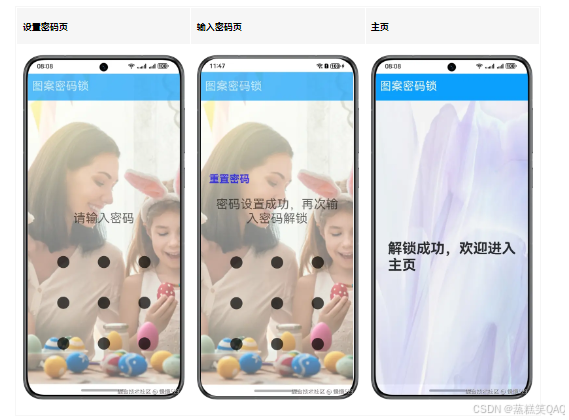
使用说明:
1.首次进入时需要设置密码,需要两次输入密码相同后点击设置密码进行设置,如果第二次输入密码和第一次输入密码不同,会提示重新输入。
2.设置密码后,需要输入密码解锁,退出应用后重新进入应用,需要再次输入密码验证,密码验证成功进入主页。
3.设置密码后,在输入密码界面有重置密码按钮,点击后需要输入旧密码,旧密码验证成功后开始设置新的密码。
具体实现
-
在pages/Home.ets中定义密码锁组件,通过定义两个变量isHasPass:是否已经设过密码;isReset:是否需要重置密码;
-
密码验证分为几种情况:[源码] 参考。
/*
 * Copyright (c) 2022 Huawei Device Co., Ltd.
 * Licensed under the Apache License, Version 2.0 (the "License");
 * you may not use this file except in compliance with the License.
 * You may obtain a copy of the License at
 *
 *     http://www.apache.org/licenses/LICENSE-2.0
 *
 * Unless required by applicable law or agreed to in writing, software
 * distributed under the License is distributed on an "AS IS" BASIS,
 * WITHOUT WARRANTIES OR CONDITIONS OF ANY KIND, either express or implied.
 * See the License for the specific language governing permissions and
 * limitations under the License.
 */
import TitleBar from '../view/TitleBar';
import CommonConstants from '../common/CommonConstants';

@Entry
@Component
struct Home {
  build() {
    Column() {
      TitleBar()
      Stack() {
        Image($r('app.media.home'))
          .width(CommonConstants.FULL_PERCENT)
          .height(CommonConstants.FULL_PERCENT)
          .objectFit(ImageFit.Fill)
          .opacity($r('app.float.image_opacity'))
        Text($r('app.string.message_unlock'))
          .fontSize($r('app.float.tips_font_size'))
          .fontWeight(FontWeight.Bold)
          .padding($r('app.float.tips_padding'))
          .alignSelf(ItemAlign.Center)
      }
      .width(CommonConstants.FULL_PERCENT)
      .height(CommonConstants.FULL_PERCENT)
    }
    .width(CommonConstants.FULL_PERCENT)
    .height(CommonConstants.FULL_PERCENT)
    .backgroundColor($r('app.color.background_color'))
  }
}
- 首次进入页面, 通过aboutToAppear()初始化调用preferences.getPreferences()获取密码,此时defaultPassword=‘null’,isHassPass=false,需设置密码并确认密码;
- 已经设过密码: 通过aboutToAppear()初始化调用preferences.getPreferences()获取密码,此时defaultPassword=‘oldPassword’,isHassPass=true,页面渲染重置密码text()。 需输入密码和defaultPassword比较,正确后跳转相应页面,若失败提示密码错误,需重新输入密码。
- 点击重置密码,此时组件清除旧密码,即defaultPassword=‘null’,此时无密码,走首次无密码流程。
- 在pages/index.ets中定义密码通过后的首页页面,[源码]参考。
/*
 * Copyright (c) 2022 Huawei Device Co., Ltd.
 * Licensed under the Apache License, Version 2.0 (the "License");
 * you may not use this file except in compliance with the License.
 * You may obtain a copy of the License at
 *
 *     http://www.apache.org/licenses/LICENSE-2.0
 *
 * Unless required by applicable law or agreed to in writing, software
 * distributed under the License is distributed on an "AS IS" BASIS,
 * WITHOUT WARRANTIES OR CONDITIONS OF ANY KIND, either express or implied.
 * See the License for the specific language governing permissions and
 * limitations under the License.
 */
import { router } from '@kit.ArkUI';
import CommonConstants from '../common/CommonConstants';
import PreferencesUtils from '../utils/PreferencesUtils';
import TitleBar from '../view/TitleBar';

@Entry
@Component
struct Index {
  private defaultPassword: string = '';
  private patternLockController: PatternLockController = new PatternLockController();
  @State message: Resource = $r('app.string.message_input');
  @State isReset: boolean = false;
  @State password: Array<number> = [];
  @State isHasPass: boolean = true;
  @State isShowSetting: boolean = false;

  async aboutToAppear() {
    this.password = [];
    this.defaultPassword = await PreferencesUtils.getPassword(getContext(this)) as string;
    if (this.defaultPassword === 'null') {
      this.isHasPass = false;
    } else {
      this.isHasPass = true;
    }
  }

  async setPassword() {
    this.defaultPassword = this.password.toString();
    await PreferencesUtils.setPassword(this.defaultPassword, getContext(this));
    this.message = $r('app.string.message_set_success');
    this.isShowSetting = false;
    this.isHasPass = true;
    this.password = [];
    this.patternLockController.reset();
    this.isReset = false;
  }

  build() {
    Column() {
      TitleBar()
      Column() {
        if (this.isHasPass && !this.isReset) {
          Text($r('app.string.reset_password'))
            .fontSize($r('app.float.reset_font_size'))
            .fontWeight(FontWeight.Bold)
            .padding($r('app.float.text_padding'))
            .width(CommonConstants.FULL_PERCENT)
            .fontColor(Color.Blue)
            .onClick(() => {
              this.isReset = true;
              this.message = $r('app.string.message_input_old');
              this.password = [];
              this.patternLockController.reset();
            })
        }
        Text(this.message)
          .textAlign(TextAlign.Center)
          .fontSize($r('app.float.input_font_size'))
          .width(CommonConstants.NINETY_PERCENT)
          .padding($r('app.float.input_font_padding'))
        PatternLock(this.patternLockController)
          .sideLength($r('app.float.patternLock_side_length'))
          .circleRadius($r('app.float.patternLock_circle_radius'))
          .pathStrokeWidth(CommonConstants.PATH_STROKE_WIDTH)
          .autoReset(true)
          .margin({ top: $r('app.float.patternLock_margin_top'), bottom: $r('app.float.patternLock_margin_bottom') })
          .onPatternComplete((input: Array<number>) => {
            if (input === null || input === undefined || input.length < CommonConstants.INPUT_LENGTH) {
              this.message = $r('app.string.message_password_length_insufficient');
              return;
            }
            if (this.isHasPass) {
              if (this.defaultPassword === input.toString()) {
                if (this.isReset) {
                  this.message = $r('app.string.message_input_new');
                  this.defaultPassword = 'null';
                  this.patternLockController.reset();
                  this.password = [];
                  this.isHasPass = false;
                  return;
                }
                router.replaceUrl({
                  url: 'pages/Home'
                });
              } else {
                this.message = $r('app.string.message_incorrect');
                this.password = [];
                return;
              }
            }
            if (this.password.length > 0) {
              if (this.password.toString() === input.toString()) {
                ;
                this.password = input;
                this.message = $r('app.string.message_correct');
                this.isShowSetting = true;
              } else {
                this.message = $r('app.string.message_not_match');
                this.patternLockController.reset();
              }
            } else {
              this.password = input;
              this.message = $r('app.string.message_input_again');
              this.patternLockController.reset();
            }
          })
        if (this.isShowSetting) {
          Button($r('app.string.message_set_password'))
            .key('setPassword')
            .margin($r('app.float.button_margin'))
            .width(CommonConstants.SIXTY_PERCENT)
            .onClick(() => {
              this.setPassword();
            })
        }
      }
      .layoutWeight(1)
      .justifyContent(FlexAlign.End)
    }
    .width(CommonConstants.FULL_PERCENT)
    .height(CommonConstants.FULL_PERCENT)
    .backgroundImage($r('app.media.bg'))
    .backgroundImageSize(ImageSize.Cover)
    .opacity($r('app.float.opacity'))
  }
}

脑启社区是一个专注类脑智能领域的开发者社区。欢迎加入社区,共建类脑智能生态。社区为开发者提供了丰富的开源类脑工具软件、类脑算法模型及数据集、类脑知识库、类脑技术培训课程以及类脑应用案例等资源。
更多推荐
 4
4 0
0- 0


 已为社区贡献2条内容

所有评论(0)