调用腾讯智能云API实现人脸性别转换
祁佳程,男,西安工程大学电子信息学院,2024级研究生研究方向:机器视觉与人工智能电子邮件:1825627843@qq.com乔幸荣,女,西安工程大学电子信息学院,2024级研究生,张宏伟人工智能课题组研究方向:模式识别与智能系统电子邮件:2029518801@qq.com1)早期阶段(20世纪50-70年代)这一阶段的API主要用于操作系统内部功能接口,供程序开发人员使用,功能简单,是软件开发的
调用腾讯智能云API实现人脸性别转换
1、作者介绍
祁佳程,男,西安工程大学电子信息学院,2024级研究生
研究方向:机器视觉与人工智能
电子邮件:1825627843@qq.com
乔幸荣,女,西安工程大学电子信息学院,2024级研究生,张宏伟人工智能课题组
研究方向:模式识别与智能系统
电子邮件:2029518801@qq.com
2、API相关介绍
2.1 API的发展阶段
1)早期阶段(20世纪50-70年代)
这一阶段的API主要用于操作系统内部功能接口,供程序开发人员使用,功能简单,是软件开发的基础工具,为后续发展奠定基础。
2)分布式时代(20世纪80年代-世纪末)
API开始用于分布式系统和网络应用,实现不同系统和语言之间的交互,变得更为复杂和结构化,推动了网络技术发展。
3)互联网时代(21世纪至今)
服务化API盛行,互联网公司开放API供开发者调用,推动“软件即服务”发展,如百度API、腾讯云等,促进生态繁荣。
2.2 API的主要功能
1)实现系统间连接与交互
API提供标准接口,使不同软件系统可以相互连接和交互,实现数据和功能共享,打破信息孤岛,促进系统协同工作。例如,企业内部的ERP系统和CRM系统通过API实现数据交互,ERP系统可以获取CRM系统中的客户信息,CRM系统可以获取ERP系统中的订单信息,从而实现业务流程的自动化和优化。
2)推动技术创新与应用开发
开发者利用API开发更强大的应用程序或服务,推动技术创新,如通过调用地图API开发导航应用,为用户提供便捷出行服务。以智能家居领域为例,开发者通过调用智能设备的API,开发出各种智能家居控制应用,用户可以通过手机远程控制家中的灯光、空调、窗帘等设备,提升了用户的居住体验。
3)降低开发成本与难度
标准化的API让开发者快速上手,无需学习新接口或语言,降低学习成本;同时,将复杂系统划分成独立部分,降低编程难度。
3、Python调用腾讯智能云实现人脸性别转换实验
3.1 API获取
1)浏览器搜索“腾讯云”,或者输入网址:https://cloud.tencent.com。
2)进行注册、实名认证。
3)新建密钥,获取”SecretId”和”SecretKey”。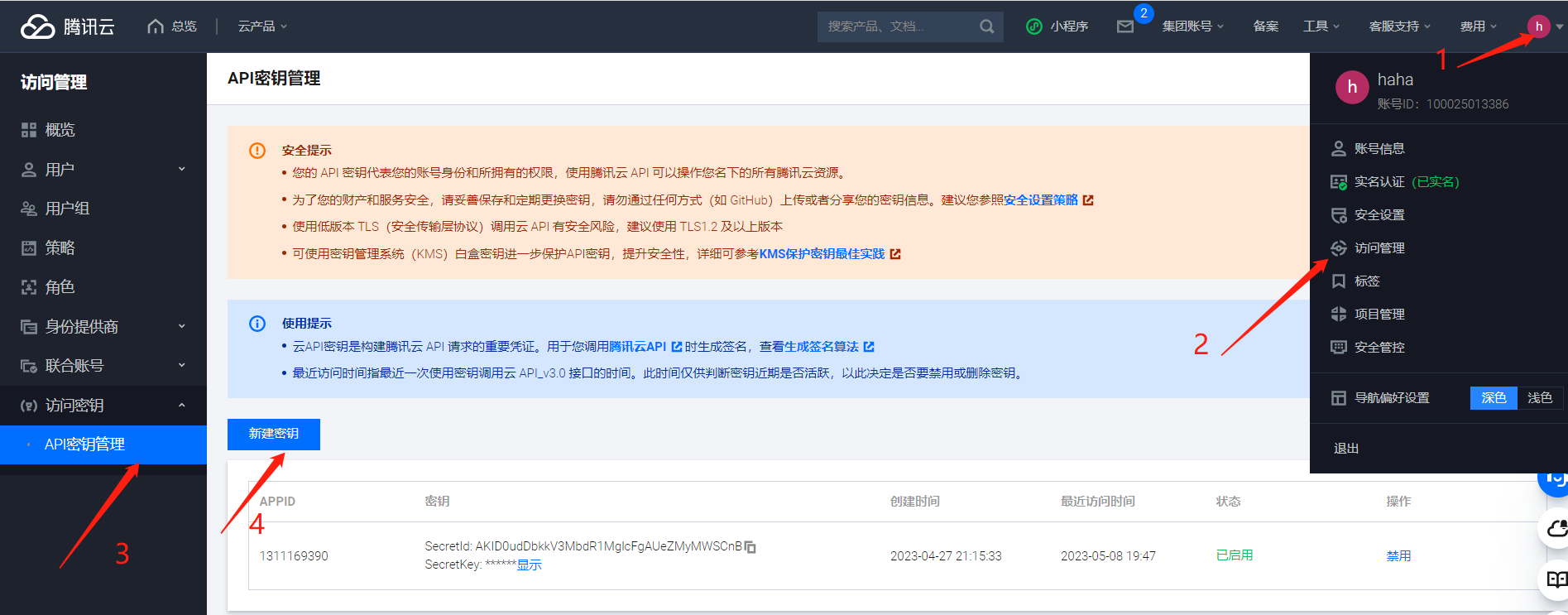
4)开通“人像”资源包接口服务。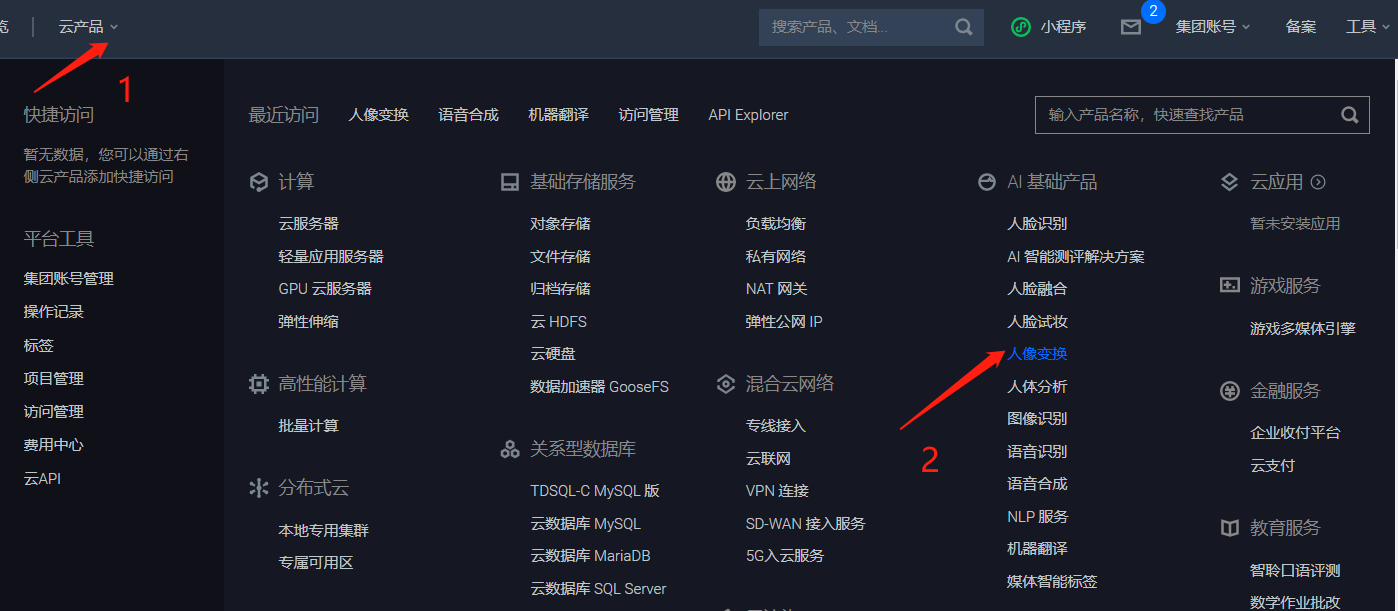

5)点击“人脸性别转换”文档链接。
6)“点击调试”按钮。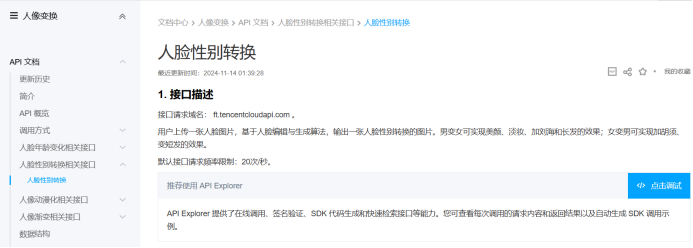
7)填写相关参数,获取“人脸性别转换”示例代码(Python为例)。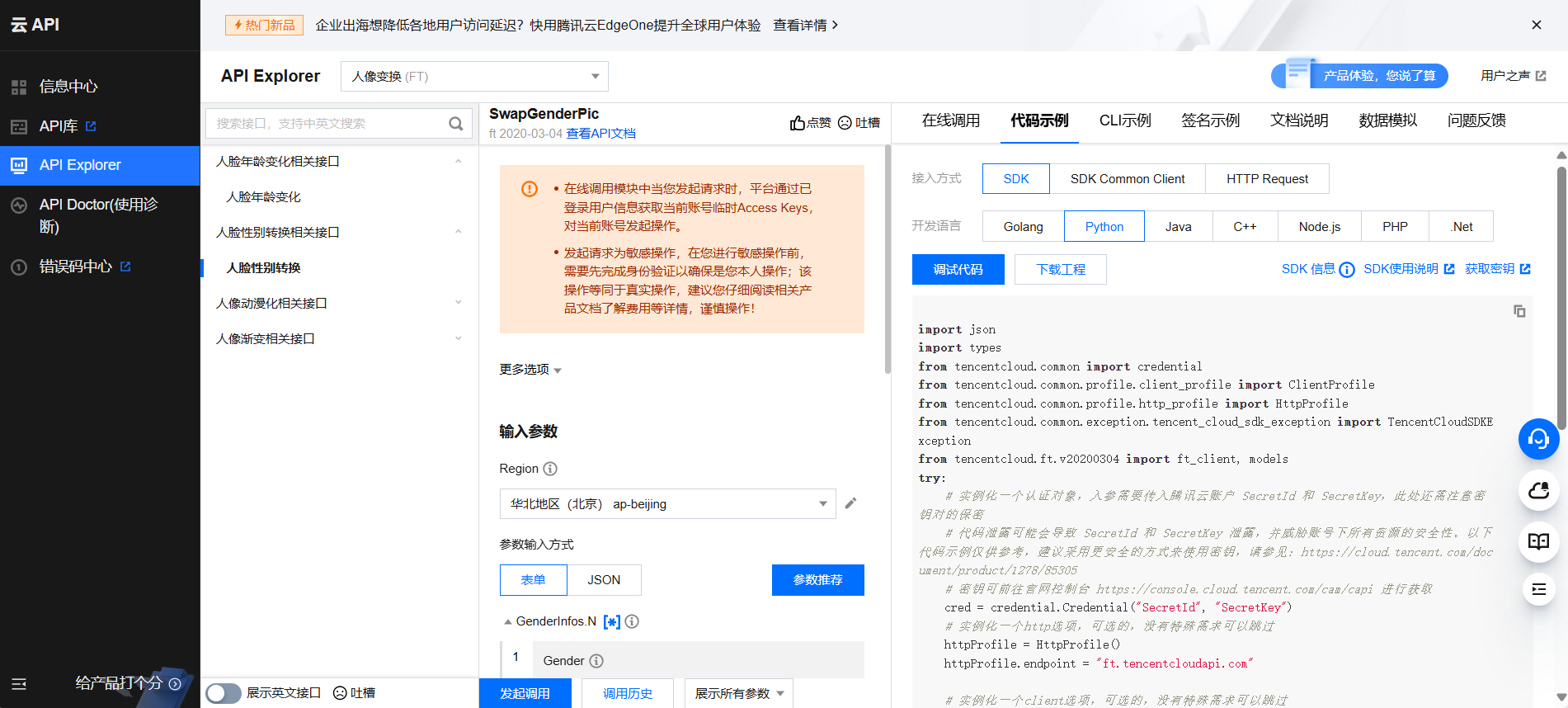
3.2 代码调试
1)pip 安装腾讯云SDK
pip install --upgrade tencentcloud-sdk-python
2)导入相关库
import json
from tencentcloud.common import credential
from tencentcloud.common.profile.client_profile import ClientProfile
from tencentcloud.common.profile.http_profile import HttpProfile
from tencentcloud.common.exception.tencent_cloud_sdk_exception import TencentCloudSDKException
from tencentcloud.iai.v20200303 import iai_client, models
from tencentcloud.ft.v20200304 import ft_client
from tencentcloud.ft.v20200304 import models as ft_models
import numpy as np
import base64
import matplotlib.pyplot as plt
import warnings
warnings.filterwarnings("ignore")
3)输入密钥
SecretId = "自己的SecretId "
SecretKey = "自己的SecretKey "
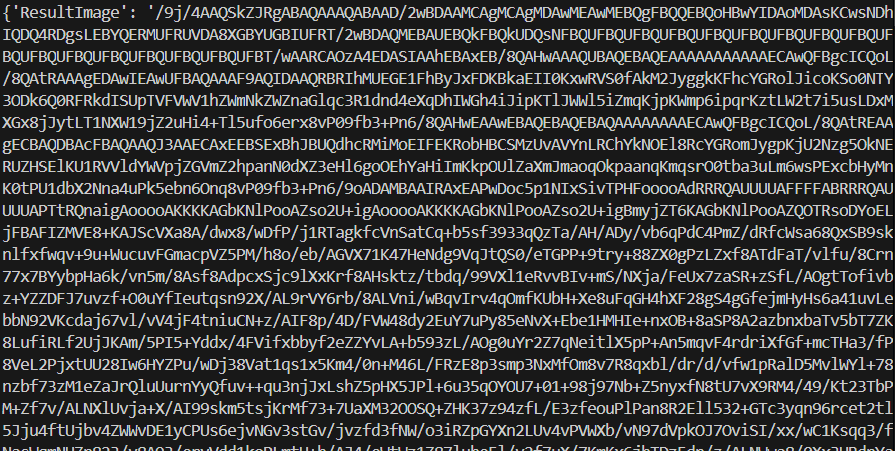
4)读取输入图像并转为base64编码(图片被转码成了一堆字符串)
img_dir = "C:/aitu/ww.jpg"
with open(img_dir, 'rb') as f:
    base64_data = base64.b64encode(f.read())
base64_code = base64_data.decode()
5)接口调用
try:
    cred = credential.Credential(SecretId, SecretKey)
    httpProfile = HttpProfile()
    httpProfile.endpoint = "ft.tencentcloudapi.com"
    clientProfile = ClientProfile()
    clientProfile.httpProfile = httpProfile
    client = ft_client.FtClient(cred, "ap-beijing", clientProfile)
    req = ft_models.SwapGenderPicRequest()
    with open(img_dir,"rb") as file:
        img=base64.b64encode(file.read())
    params = {
        "Image": str(img, encoding='utf-8'),
#         "Url": "",
        "GenderInfos": [
            {
                "Gender":1,  # 选择转换方向,0:男变女,1:女变男。
                "FaceRect": {
                    "Y": 1,
                    "X": 1,
                    "Width": 897,
                    "Height": 947
                }
            }
        ],
        "RspImgType": "base64"
}
req.from_json_string(json.dumps(params))

    resp = client.SwapGenderPic(req).to_json_string()
    resp=json.loads(resp)
print(resp)
6)保存性别转换结果图像
except TencentCloudSDKException as err:
    print(err)
with open("C:/aitu/ww1.jpg","wb") as file:
    file.write(base64.b64decode(resp['ResultImage']))
face=plt.imread("C:/aitu/ww1.jpg")
plt.imshow(face)
3.3 完整代码
import json
from tencentcloud.common import credential
from tencentcloud.common.profile.client_profile import ClientProfile
from tencentcloud.common.profile.http_profile import HttpProfile
from tencentcloud.common.exception.tencent_cloud_sdk_exception import TencentCloudSDKException
from tencentcloud.iai.v20200303 import iai_client, models
from tencentcloud.ft.v20200304 import ft_client
from tencentcloud.ft.v20200304 import models as ft_models
import numpy as np
import base64
import matplotlib.pyplot as plt
import warnings
warnings.filterwarnings("ignore")

SecretId = "自己的SecretId"
SecretKey = "自己的SecretKey"

img_dir = "C:/aitu/ww.jpg"
with open(img_dir, 'rb') as f:
    base64_data = base64.b64encode(f.read())
    base64_code = base64_data.decode()

try:
    cred = credential.Credential(SecretId, SecretKey)
    httpProfile = HttpProfile()
    httpProfile.endpoint = "ft.tencentcloudapi.com"
    clientProfile = ClientProfile()
    clientProfile.httpProfile = httpProfile
    client = ft_client.FtClient(cred, "ap-beijing", clientProfile)
    req = ft_models.SwapGenderPicRequest()
    with open(img_dir,"rb") as file:
        img=base64.b64encode(file.read())
    params = {
        "Image": str(img, encoding='utf-8'),
#         "Url": "",
        "GenderInfos": [
            {
                "Gender":1,  # 选择转换方向,0:男变女,1:女变男。
                "FaceRect": {
                    "Y": 1,
                    "X": 1,
                    "Width": 897,
                    "Height": 947
                }
            }
        ],
        "RspImgType": "base64"
    }
    req.from_json_string(json.dumps(params))

    resp = client.SwapGenderPic(req).to_json_string()
    resp=json.loads(resp)
    print(resp)

except TencentCloudSDKException as err:
    print(err)
with open("C:/aitu/ww1.jpg","wb") as file:
    file.write(base64.b64decode(resp['ResultImage']))
face=plt.imread("C:/aitu/ww1.jpg")
plt.imshow(face)
3.4 效果展示
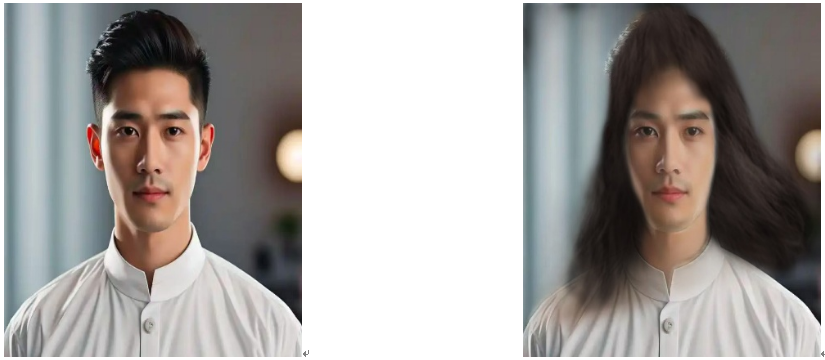
男变女主要靠的是淡化胡须,加长头发和一定程度的淡化脸部轮廓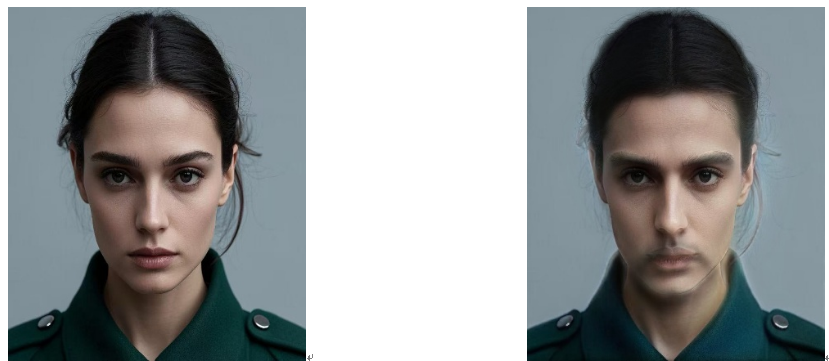
女变男主要靠的是增添胡须,减短头发和一定程度的加深脸部轮廓
4、问题与分析
1 )“Gender”:1, # 选择转换方向,0:男变女,1:女变男。这个地方要设置好。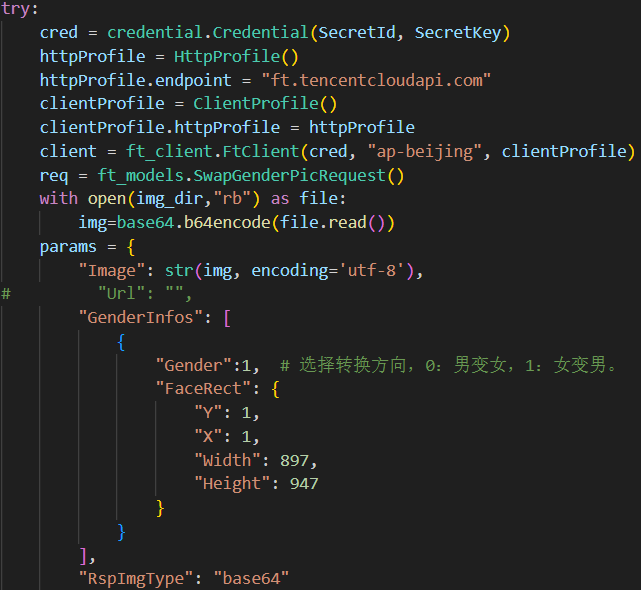
2) 查看对应图像的属性,将“Width,Height”设置好,才能准确定位人脸位置。(点击对应图片-右键属性-属性修改)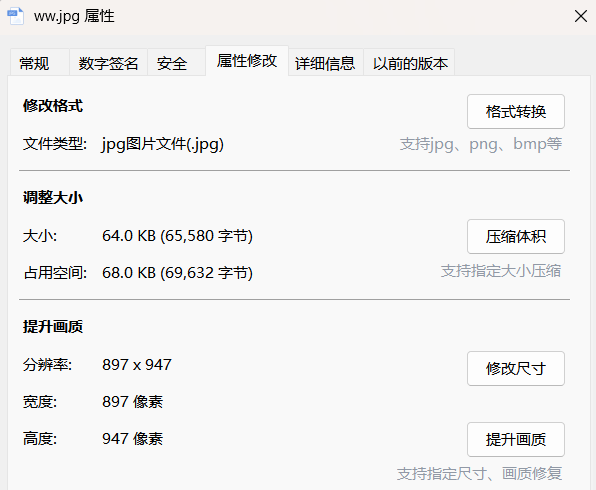
3 )转换图片要求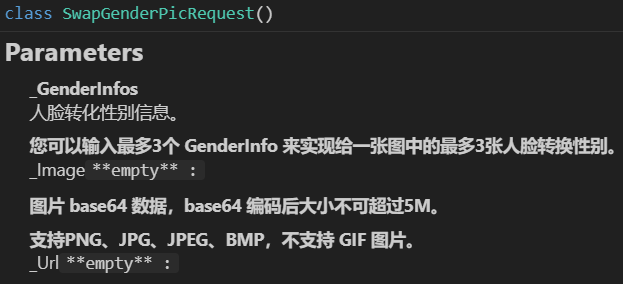
4) 局限与展望
a、不能自动识别男性女性进行性别别换,需要手动调整。因此不适用于男女共存于一张图的情况。未来可以使用 OpenCV 和一些预训练好的人脸检测与性别识别模型(例如 dlib、DeepFace),分布式的进行智能性别识别,之后进行转换来改进这一局限。
b、多人情况下效果欠佳,仅中间位置人脸变化较大。未来可在调用腾讯 API 进行人脸性别转换前,先使用OpenCV 结合深度学习模型对图像中的每个人脸进行检测和裁剪(如 Haar 级联分类器、MTCNN 等),将每个人脸作为独立的图像分别调用API进行处理,最后再将处理后的人脸合并回原始图像。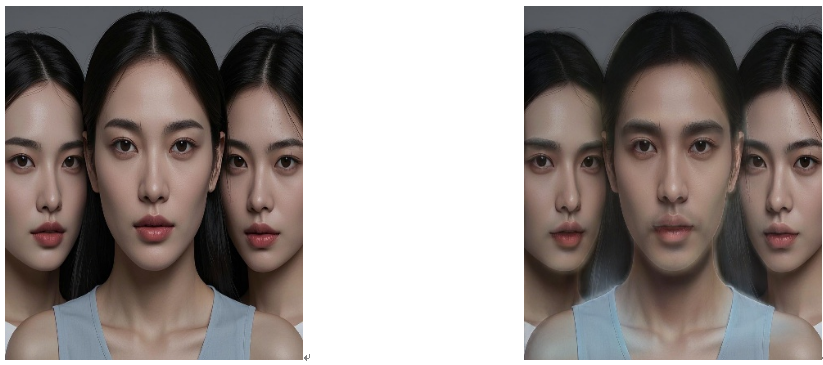

脑启社区是一个专注类脑智能领域的开发者社区。欢迎加入社区,共建类脑智能生态。社区为开发者提供了丰富的开源类脑工具软件、类脑算法模型及数据集、类脑知识库、类脑技术培训课程以及类脑应用案例等资源。
更多推荐

 12
12 0
0- 0


 已为社区贡献10条内容

所有评论(0)