NumPy 2.x 完全指南【五】数据类型
一般对于程序员来说编程语言自带的 int、long、float 等类型就已经够用了。但是在机器学习领域,数据量都是非常大的,比如一张 224x224 的 RGB 图片用 float32 类型存储时,就需要占用 588 KB 内存,进行各种运算时会消耗大量的计算机资源。对于一些特定的数据类型 GPU 才支持加速,深度学习框架也会对数据类型有所要求,所以在 AI 领域,数据类型非常重要。
文章目录
1. 引言
一般对于程序员来说编程语言自带的 int、long、float 等类型就已经够用了。但是在机器学习领域,数据量都是非常大的,比如一张 224x224 的 RGB 图片用 float32 类型存储时,就需要占用 588 KB 内存,进行各种运算时会消耗大量的计算机资源。对于一些特定的数据类型 GPU 才支持加速,深度学习框架也会对数据类型有所要求,所以在 AI 领域,数据类型非常重要。
2. 数据类型
NumPy 支持比 Python 更多的数据类型,有 5 种基本的数值类型:
- 布尔值(
bool)(注:同Python一样,bool是int的子类) - 有符号整数(
int) - 无符号整数(
uint) - 浮点数(
float) - 复数
NumPy 支持的所有数据类型表格说明:
| 数据类型 | 类型代码 | 描述 |
|---|---|---|
numpy.bool_ |
'?' |
布尔类型(True 或 False) |
numpy.int8 |
'i1' |
8位有符号整数(范围:-128 到 127) |
numpy.uint8 |
'u1' |
8位无符号整数(范围:0 到 255) |
numpy.int16 |
'i2' |
16位有符号整数(范围:-32768 到 32767) |
numpy.uint16 |
'u2' |
16位无符号整数(范围:0 到 65535) |
numpy.int32 |
'i4' |
32位有符号整数(范围:-2³¹ 到 2³¹-1) |
numpy.uint32 |
'u4' |
32位无符号整数(范围:0 到 2³²-1) |
numpy.int64 |
'i8' |
64位有符号整数(范围:-2⁶³ 到 2⁶³-1) |
numpy.uint64 |
'u8' |
64位无符号整数(范围:0 到 2⁶⁴-1) |
numpy.float16 |
'f2' |
16位半精度浮点数(符号1位,指数5位,尾数10位) |
numpy.float32 |
'f4' |
32位单精度浮点数(符号1位,指数8位,尾数23位) |
numpy.float64 |
'f8' |
64位双精度浮点数(符号1位,指数11位,尾数52位) |
numpy.complex64 |
'c8' |
64位复数(由两个 float32 组成,实部和虚部各32位) |
numpy.complex128 |
'c16' |
128位复数(由两个 float64 组成,实部和虚部各64位) |
numpy.str_ |
'U' |
Unicode 字符串类型(如 'U10' 表示最多10个字符的字符串) |
numpy.bytes_ |
'S' |
ASCII 字节字符串类型(如 'S5' 表示最多5字节的字符串) |
numpy.object_ |
'O' |
Python 对象类型(可存储任意 Python 对象,但失去 NumPy 性能优势) |
numpy.void |
'V' |
自定义结构化类型(用于存储原始字节数据或复合结构) |
numpy.datetime64 |
'M' |
日期时间类型(如 'M8[ns]' 表示纳秒级时间戳) |
numpy.timedelta64 |
'm' |
时间间隔类型(如 'm8[us]' 表示微秒级时间差) |
直接使用 Python 原生类型作为 dtype 参数时,会自动(隐式)映射到对应的 NumPy 类型:
| Python 类型 | 对应的 NumPy 数据类型 | 说明 |
|---|---|---|
int |
numpy.int_ |
平台(如 32 位与 64 位 CPU 架构)相关(通常为 int32 或 int64) |
bool |
numpy.bool |
布尔类型 |
float |
numpy.float64 |
双精度浮点数(64位) |
complex |
numpy.complex128 |
双精度复数(128位,实部和虚部分别64位) |
2.1 布尔类型
布尔类型通过 numpy.bool_ 或 numpy.bool 表示,与 Python 原生的布尔类型 bool 兼容但更高效,底层存储占用 1 字节(8 位) 。
不指定类型时会自动推断:
import numpy as np

a = np.array([True, True, False])
print(a.dtype) # 输出 bool
可以显式的指定:
# 使用 Python 原生 bool
a = np.array([True, True, False], dtype=bool)
# 使用 NumPY 自己的 bool 类型
b = np.array([True, True, False], dtype=np.bool_)
c = np.array([True, True, False], dtype=np.bool)
也可以类型代码字符串(数据类型的简写符号)指定:
a  =np.array([True, False, False], dtype="?")
print(a)  # 输出: [ True False  True]
print(a.dtype)  # 输出: bool

b = np.array([True, False, False], dtype="b")
print(b)  # 输出: [1 0 0]
print(b.dtype)  # 输出: int8
支持元素级的 &(与)、|(或)、~(非)运算:
a = np.array([True, True, False])
b = np.array([True, False, False])
print(a & b)  # 输出: [ True False False]
print(a | b)  # 输出: [ True  True False]
print(~a)  # 输出: [False False  True]
支持整数和布尔类型之间的转换操作:
- 整数–>布尔:零值转为
False,非零值转为True - 布尔–>整数:
False转为0,True转为1
示例:
a = np.array([1, 0, -1], dtype=np.bool_)
print(a)  # 输出: [ True False  True]
print(a.dtype)  # 输出: bool

b = np.array([True, False, False], dtype=int)
print(b)  # 输出: [1 0 0]
print(b.dtype)  # 输出: int64
2.2 整数类型
像 C/C++ 语言一样,NumPY 中的整型也区分有符号和无符号:
- 有符号整数:最高位为符号位(
0正1负)。 - 无符号整数:无符号位,所有位表示数值。
2.2.1 有符号整数类型
有符号整数类型:
| 数据类型 | 类型代码 | 内存占用 | 取值范围 |
|---|---|---|---|
numpy.int8 |
'i1' |
1 字节 | -128 到 127 |
numpy.int16 |
'i2' |
2 字节 | -32,768 到 32,767 |
numpy.int32 |
'i4' |
4 字节 | -2³¹ 到 2³¹-1 |
numpy.int64 |
'i8' |
8 字节 | -2⁶³ 到 2⁶³-1 |
不指定类型或者使用 Python int 类型时,会自动转为 int64 :
import numpy as np

a = np.array([1, 100, 1000])
print(a.dtype)  # 输出: int64

a = np.array([1, 100, 1000], dtype=int)
print(a.dtype)  # 输出: int64
int32 是比较常用的类型,全称为 32 位有符号整数,内存占用 4 个字节,示例:
import numpy as np

a = np.array([1, 100, 1000])
print(a.dtype)  # 输出: int64

b = a.astype(np.int32) # 转换(注意需要使用新对象接收)
print(b.dtype)  # 输出: int32

a = np.array([1, 100, 1000], dtype=np.int32)
print(a.dtype)  # 输出: int32

a = np.array([1, 100, 1000], dtype="i4")
print(a.dtype)  # 输出: int32
2.2.2 无符号整数类型
无符号整数主要用于处理非负整数数据,其取值范围从 0 开始,内存占用与对应的有符号类型相同,但可表示的正数范围更大。
| 数据类型 | 类型代码 | 内存占用 | 取值范围 |
|---|---|---|---|
numpy.uint8 |
'u1' |
1 字节 | 0 到 255 |
numpy.uint16 |
'u2' |
2 字节 | 0 到 65,535 |
numpy.uint32 |
'u4' |
4 字节 | 0 到 2^32 - 1 |
numpy.uint64 |
'u8' |
8 字节 | 0 到 2^64 - 1 |
uint32 全称为 32 位无符号整数,内存占用 4 个字节,取值范围为 0 到 4,294,967,295(约 42 亿)。
示例:
import numpy as np

a = np.array([1, 100, 1000], dtype=np.uint32)
print(a.dtype)  # 输出: uint32

a = np.array([1, 100, 1000], dtype="u4")
print(a.dtype)  # 输出: uint32

b = a.astype(np.uint32) # 转换(注意需要使用新对象接收)
print(b.dtype)  # 输出: uint32
2.3 浮点类型
使用 IEEE 754 国际标准的浮点数,众所周知,在计算机中整数都可以用二进制来准确表示,但是浮点数无法避免精度问题。
| 数据类型 | 类型代码 | 内存占用 | 取值范围 |
|---|---|---|---|
numpy.float16 |
'e' |
2 字节 | ±65504(半精度浮点) |
numpy.float32 |
'f' |
4 字节 | ±3.4e±38(单精度浮点) |
numpy.float64 |
'd' |
8 字节 | ±1.8e±308(双精度浮点) |
不指定类型或者使用 Python float 类型时,会自动转为 float64 :
a = np.array([1.1, 2.2, 3.3])
print(a.dtype)  # 输出: float64

a = np.array([1.1, 2.2, 3.3], dtype=float)
print(a.dtype)  # 输出: float64
在科学计算、深度学习、图形处理等领域中,float32 是最常用的类型,全称为 32 位单精度浮点数,内存占用 4 字节。
示例:
import numpy as np

a = np.array([1.1, 2.2, 3.3], dtype=np.float32)
print(a.dtype)  # 输出: float32

a = np.array([1.1, 2.2, 3.3], dtype="f")
print(a.dtype)  # 输出: float32
2.4 复数类型
在初中时,我们就学过有理数和无理数统称为实数,实数可以用数轴上的点表示。但是实数并不能描述所有的数学问题,所以又引入了虚数和复数,关于复数的发展历史、定义、运算规则、应用领域,需要您自己去探索发现哦。
NumPy 支持两种复数类型:
| 数据类型 | 类型代码 | 描述 |
|---|---|---|
numpy.complex64 |
'c8' |
64 位复数(由两个 float32 组成,实部和虚部各 32 位) |
numpy.complex128 |
'c16' |
128 位复数(由两个 float64 组成,实部和虚部各 64 位) |
示例:
import numpy as np

# 默认复数类型(complex128)
arr_default = np.array([1 + 2j, 3 + 4j])
print(arr_default.dtype)  # 输出 complex128

# 显式指定 complex64
arr_float32 = np.array([1 + 2j, 3 + 4j], dtype=np.complex64)
print(arr_float32.dtype)  # 输出 complex64

# 显式指定 c8
arr_float32 = np.array([1 + 2j, 3 + 4j], dtype="c8")
print(arr_float32.dtype)  # 输出 complex64
2.5 字符串类型
NumPy 支持两种字符串类型:
| 数据类型 | 类型代码 | 详情 |
|---|---|---|
numpy.str_ |
'U' |
Unicode 字符串类型(如 'U10' 表示最多 10 个字符的字符串) |
numpy.bytes_ |
'S' |
ASCII 字节字符串类型(如 'S5' 表示最多 5 字节的字符串) |
2.5.1 字节字符串
在 Python 中,字节字符串(bytes)一种特殊类型的字符串,常用于用于表示二进制数据,使用前缀 b 或 B 来表示,示例:
bytes_str= b'hello world'
print(bytes_str)
在 NumPy 中的字节字符串使用方式一样:
a = np.array([b"Hello", b"world"])
print(a.dtype) # 输出: |S5
print(a)  # 输出: [b'Hello' b'world']
dtype 输出各部分解释如下:
|:字节顺序,|代表不适用,因为字节顺序对单字节字符无意义。S:字符串类型,S代表是字节字符串。5:字符最大长度,5代表最大长度为 5 个字符。
对于普通字符串,可以使用 np.bytes_ 指定为字节字符串:
a = np.array(["Hello", "world"], dtype=np.bytes_)
print(a.dtype) # 输出: |S5
print(a)  # 输出: [b'Hello' b'world']
也可以使用 S 加上长度指定类型,当元素字符长度超出时会被截取:
a = np.array(["Hello", "world"], dtype="S3")
print(a.dtype)  # [b'Hel' b'wor']
print(a)  # 输出: |S3
2.5.2 普通字符串
在 NumPy 中创建普通字符串类型数组示例:
a = np.array(["Hello", "world"])
print(a.dtype)  # 输出: <U5
print(a) # ['Hello' 'world']


a = np.array(["Hello", "world"], dtype=np.str_)
print(a.dtype) # 输出: <U5
print(a)   # 输出: ['Hello' 'world']

a = np.array(["你好", "世界"], dtype=np.str_)
print(a.dtype)  # 输出: <U2
print(a) # 输出:['Hello' 'world']
dtype 输出各部分解释如下:
<:字节顺序,<表示小端序,>表示大端序。U:字符串类型,U表示是Unicode字符串类型。5:字符最大长度。
3. 类型转换
3.1 NumPy 类型
使用数组对象(ndaray)的 astype() 方法可以转换元素的数据类型,并返回一个新的对象。
方法定义:
def astype(
    self,
    dtype: _DTypeLike[_SCT],
    order: _OrderKACF = ...,
    casting: _CastingKind = ...,
    subok: builtins.bool = ...,
    copy: builtins.bool | _CopyMode = ...,
) -> ndarray[_ShapeT_co, dtype[_SCT]]: ...
示例:
z.astype(np.float64)
print(z) # array([0.,  1.,  2.])
还可以使用 numpy.astype 函数:
@array_function_dispatch(_astype_dispatcher)
def astype(x, dtype, /, *, copy=True, device=None):
示例:
# 原始数组(int32类型)
arr = np.array([1, 2, 3], dtype=np.int32)

# 转换为float64(强制复制)
result = np.astype(arr, np.float64)
print(result.dtype)  # float64
print(np.shares_memory(arr, result))  # False
3.2 Python 类型
在某些情况下,例如在 Web 开发场景中,需要通过 API 返回序列化的 JSON 数据时,一般都需要将 NumPy 数组对象转换为 Python 原生类型。
NumPy 数组对象提供了 item() 方法,用于将数组中的单个元素提取为 Python 原生标量(简单理解为单个的数字)类型。
示例:
# 单元素数组
arr_scalar = np.array(42)
value = arr_scalar.item()
print(value, type(value))  # 输出: 42 <class 'int'>

# 指定位置的元素
arr = np.array([10, 20, 30])
element = arr[1].item()
print(element, type(element))  # 输出: 20 <class 'int'>
可以使用 Python 的类型函数,例如 int、float、complex、str 等直接进行转换:
# 单元素数组
arr = np.array(42)
value = int(arr)
print(value, type(value))  # 输出: 42 <class 'int'>

# 指定位置的元素
arr = np.array([10, 20, 30])
value = float(arr[1])
print(value, type(value))  # 输出: 20.0 <class 'float'>
NumPy 数组对象也提供了 tolist() 方法,可以将多维数组层转换为嵌套列表:
# 一维数组
arr_1d = np.array([1, 2, 3])
list_1d = arr_1d.tolist()
print(list_1d)  # 输出: [1, 2, 3]

# 二维数组
arr_2d = np.array([[1, 2], [3, 4]])
list_2d = arr_2d.tolist()
print(list_2d)  # 输出: [[1, 2], [3, 4]]

# 布尔数组
bool_arr = np.array([True, False, True])
bool_list = bool_arr.tolist()
print(bool_list)  # 输出: [True, False, True]
4. 数据类型对象
在使用 numpy.dtype 属性时,获取到的是一个数据类型对象实例,包含了很多类型信息,比如其位宽和字节顺序: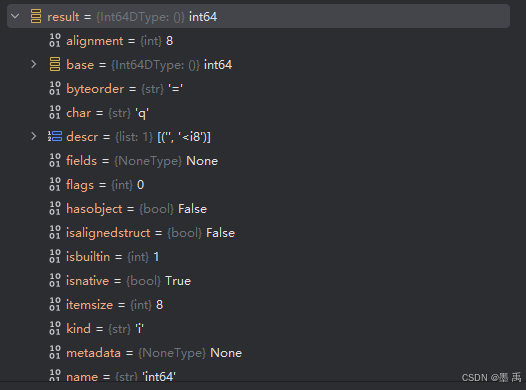
在创建数组、类型转换时, dtype 参数还支持传入数据类型对象类,示例:
a = np.array([1.1, 2.2, 3.3], dtype=np.dtypes.Float32DType)
print(a.dtype)  # 输出: float32
可以直接创建类型对象,查询类型的属性信息:
# 方式 1
d1 = np.dtype(np.int64)
# 方式 2
d2=dtype('int64')

# 查看属性
print("name:", dtype_int64.name)         # 输出: int64
print("type:", dtype_int64.type)         # 输出: <class 'numpy.int64'>
print("itemsize:", dtype_int64.itemsize) # 输出: 8
print("byteorder:", dtype_int64.byteorder) # 输出: '='
print("alignment:", dtype_int64.alignment) # 输出: 8
print("char:", dtype_int64.char)        # 输出: 'l'(可能因平台不同)
print("str:", dtype_int64.str)           # 输出: '<i8' 或类似
在 numpy.dtypes.pyi 源文件中列出了支持的数据类型对象类:
__all__ = [
    'BoolDType',
    'Int8DType',
    'ByteDType',
    'UInt8DType',
    'UByteDType',
    'Int16DType',
    'ShortDType',
    'UInt16DType',
    'UShortDType',
    'Int32DType',
    'IntDType',
    'UInt32DType',
    'UIntDType',
    'Int64DType',
    'LongDType',
    'UInt64DType',
    'ULongDType',
    'LongLongDType',
    'ULongLongDType',
    'Float16DType',
    'Float32DType',
    'Float64DType',
    'LongDoubleDType',
    'Complex64DType',
    'Complex128DType',
    'CLongDoubleDType',
    'ObjectDType',
    'BytesDType',
    'StrDType',
    'VoidDType',
    'DateTime64DType',
    'TimeDelta64DType',
    'StringDType',
]

脑启社区是一个专注类脑智能领域的开发者社区。欢迎加入社区,共建类脑智能生态。社区为开发者提供了丰富的开源类脑工具软件、类脑算法模型及数据集、类脑知识库、类脑技术培训课程以及类脑应用案例等资源。
更多推荐



 19
19 0
0- 0


 已为社区贡献4条内容

所有评论(0)