基于Python实现身份证版面信息高精度识读
目录
在金融开户、政务办理及实名认证等业务场景中,身份证信息的自动化提取(OCR)是核心环节。面对移动端采集的图像,系统需克服手持拍摄导致的90°/180°/270°旋转、倾斜、光照不均等干扰,同时需在无GPU硬件加速的通用服务器上实现3秒内的快速响应。
本文将阐述一套基于Python的轻量级高精度身份证识别方案。该方案采用先进的深度学习文本检测与识别模型,仅利用CPU计算资源即可满足工业级性能要求。
1. 技术架构选型
为满足“高精度、抗干扰、纯CPU推理”的需求,技术选型遵循以下原则:
- 推理引擎:采用 PaddleOCR (v5轻量级模型)。该模型包含文本方向分类、文本检测、和文本识别三个阶段,所有模型均为轻量级模型,具备极高的推理效率。
- 后处理逻辑:基于正则表达式(Regex)与几何坐标定位,对非结构化的OCR结果进行结构化解析,精准提取姓名、性别、民族、出生日期、住址及身份证号。
2. 安装环境
本方案基于Python 3.10环境,Ubuntu操作系统。
首先创建虚拟环境:
# 1. 进入项目目录
cd /path/to/your/project

# 2. 创建虚拟环境(命名为 venv,也可自定义名称,如 myenv)
python3 -m venv myvenv

# 3. 激活虚拟环境
source myvenv/bin/activate
然后安装相关依赖(注意PaddleOCR对版本要求极高,必须参考官方教程进行安装)。
首先安装PaddlePaddle的CPU版本,这是支撑PaddleOCR的官方深度学习引擎库,参考官网最新版进行安装即可: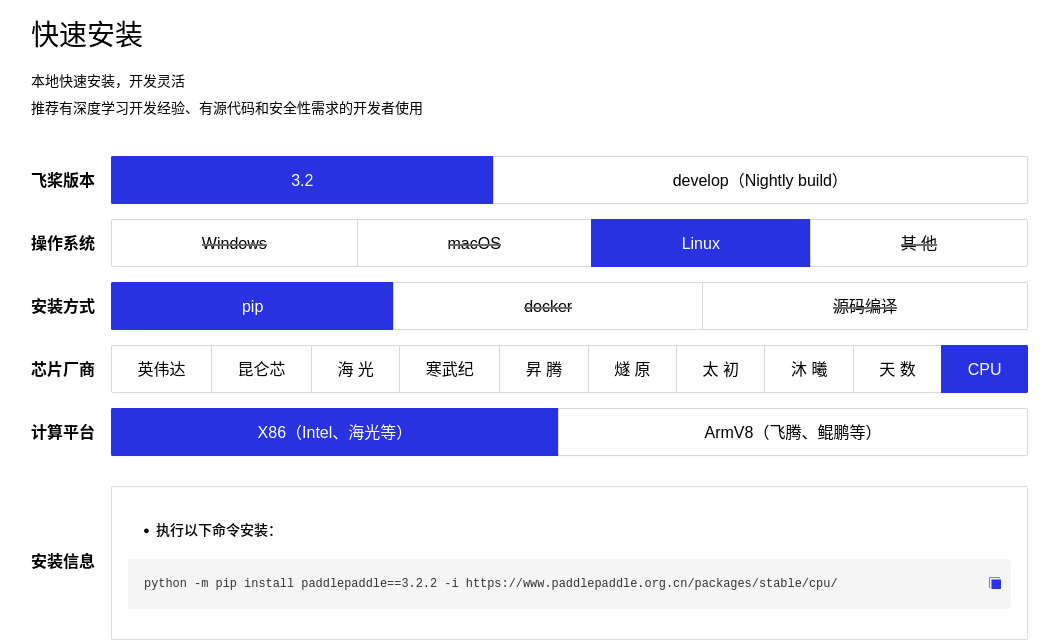 从上述官网可以看到,PaddlePaddle的具体安装命令如下:
python -m pip install paddlepaddle==3.2.2 -i https://www.paddlepaddle.org.cn/packages/stable/cpu/
安装好以后再安装具体的PaddleOCR库:
python -m pip install paddleocr
3. 核心代码实现
3.1 PaddleOCRv5测试
首先使用官方命令测试下PaddleOCRv5对于身份证图片读取的基本性能,完整测试代码如下:
from paddleocr import PaddleOCR
# 初始化 PaddleOCR 实例
ocr = PaddleOCR(
    use_doc_orientation_classify=True,
    use_doc_unwarping=False,
    use_textline_orientation=False,
    text_detection_model_name="PP-OCRv5_mobile_det",
    text_recognition_model_name="PP-OCRv5_mobile_rec",
    text_det_thresh = 0.7,
    text_rec_score_thresh = 0.7)

# 对示例图像执行 OCR 推理
result = ocr.predict(
    input="./test.jpeg")

# 可视化结果并保存 json 结果
for res in result:
    res.print()
    res.save_to_img("output")
    res.save_to_json("output")
上述代码是我参考官方示例后针对身份证识别场景稍微修改的版本。运行上述代码,程序会自动下载模型然后进行识别:
Creating model: ('PP-LCNet_x1_0_doc_ori', None)
Model files already exist. Using cached files. To redownload, please delete the directory manually: `/home/qb/.paddlex/official_models/PP-LCNet_x1_0_doc_ori`.
Creating model: ('PP-OCRv5_mobile_det', None)
Model files already exist. Using cached files. To redownload, please delete the directory manually: `/home/qb/.paddlex/official_models/PP-OCRv5_mobile_det`.
Creating model: ('PP-OCRv5_mobile_rec', None)
Model files already exist. Using cached files. To redownload, please delete the directory manually: `/home/qb/.paddlex/official_models/PP-OCRv5_mobile_rec`.
记住上述模型的路径,后续可以把模型拷贝到项目根目录执行。
运行后,程序输出如下:
Checking connectivity to the model hosters, this may take a while. To bypass this check, set `DISABLE_MODEL_SOURCE_CHECK` to `True`.
/home/qb/code/电动自行车项目/身份证号识别/venv/lib/python3.10/site-packages/paddle/utils/cpp_extension/extension_utils.py:718: UserWarning: No ccache found. Please be aware that recompiling all source files may be required. You can download and install ccache from: https://github.com/ccache/ccache/blob/master/doc/INSTALL.md
  warnings.warn(warning_message)
Creating model: ('PP-LCNet_x1_0_doc_ori', None)
Model files already exist. Using cached files. To redownload, please delete the directory manually: `/home/qb/.paddlex/official_models/PP-LCNet_x1_0_doc_ori`.
Creating model: ('PP-OCRv5_mobile_det', None)
Model files already exist. Using cached files. To redownload, please delete the directory manually: `/home/qb/.paddlex/official_models/PP-OCRv5_mobile_det`.
Creating model: ('PP-OCRv5_mobile_rec', None)
Model files already exist. Using cached files. To redownload, please delete the directory manually: `/home/qb/.paddlex/official_models/PP-OCRv5_mobile_rec`.
{'res': {'input_path': './test.jpeg', 'page_index': None, 'model_settings': {'use_doc_preprocessor': True, 'use_textline_orientation': False}, 'doc_preprocessor_res': {'input_path': None, 'page_index': None, 'model_settings': {'use_doc_orientation_classify': True, 'use_doc_unwarping': False}, 'angle': 0}, 'dt_polys': array([[[ 450,  449],
        ...,
        [ 462,  518]],

       ...,

       [[2361, 1197],
        ...,
        [2361, 1235]]], shape=(15, 4, 2), dtype=int16), 'text_det_params': {'limit_side_len': 64, 'limit_type': 'min', 'thresh': 0.7, 'max_side_limit': 4000, 'box_thresh': 0.6, 'unclip_ratio': 1.5}, 'text_type': 'general', 'textline_orientation_angles': array([-1, ..., -1], shape=(15,)), 'text_rec_score_thresh': 0.7, 'return_word_box': False, 'rec_texts': ['姓名代用名', '民族汉', '日', '性别男', '年05月06', '2013', '出生2', '住址湖南省长沙市开福区巡道街', '幸福小区居民组', '430512198908131367', '公民身份证号码', 'Shot on Y93s', 'vivo dual camera', '2023.07.1118:04'], 'rec_scores': array([0.99791259, ..., 0.98704731], shape=(14,)), 'rec_polys': array([[[ 450,  449],
        ...,
        [ 462,  518]],

       ...,

       [[2361, 1197],
        ...,
        [2361, 1235]]], shape=(14, 4, 2), dtype=int16), 'rec_boxes': array([[ 450, ...,  518],
       ...,
       [2361, ..., 1235]], shape=(14, 4), dtype=int16)}}
在项目根目录下会生成output文件夹,该文件夹下会保存识别结果图像,如下图所示: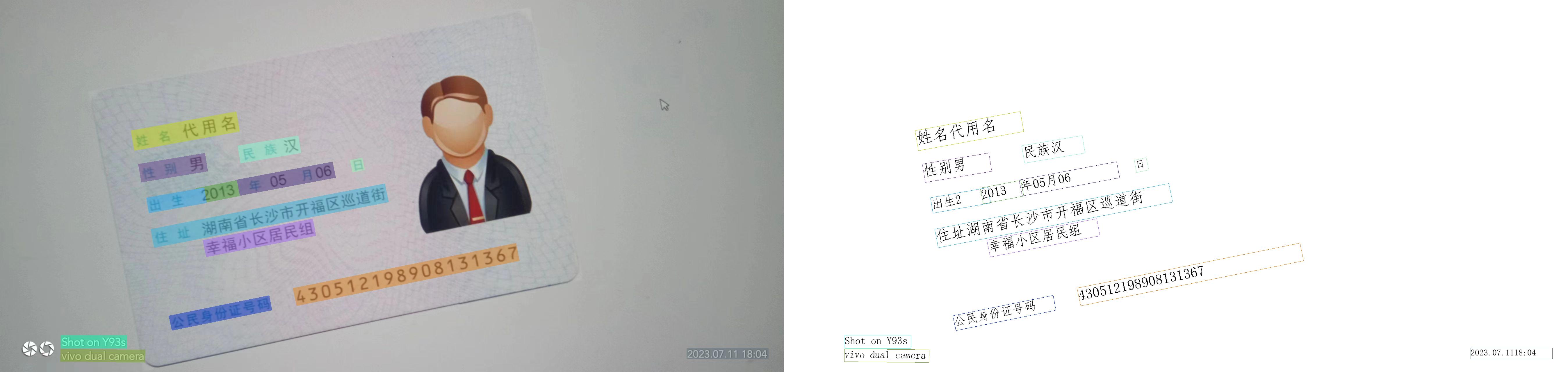
可以看到,目前算法对于这种存在一定角度倾斜的身份证,所有文字全部识别了出来,准确率还是比较高的。另外,由于模型中使用来方向分类器,因此,即使身份证旋转90、180、270度都没有关系,都可以矫正并识别出来。
为了方便后续将整个算法部署为微服务,先把所有模型拷贝到当前项目根目录下。如下图所示: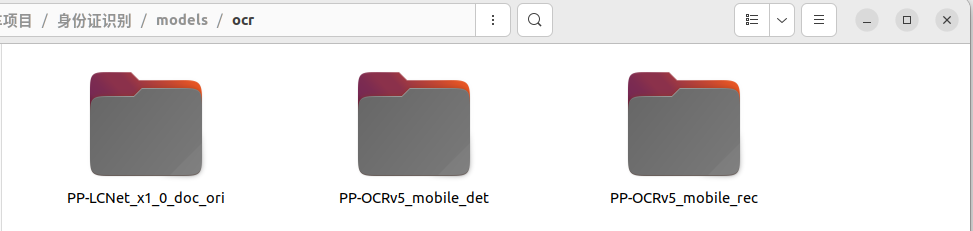
然后修改上述代码:
from paddleocr import PaddleOCR
# 初始化 PaddleOCR 实例
ocr = PaddleOCR(
    use_doc_orientation_classify=True,
    use_doc_unwarping=False,
    use_textline_orientation=False,
    text_detection_model_name="PP-OCRv5_mobile_det",
    text_recognition_model_name="PP-OCRv5_mobile_rec",
    text_det_thresh = 0.7,
    text_rec_score_thresh = 0.7,
    doc_orientation_classify_model_dir='./models/ocr/PP-LCNet_x1_0_doc_ori',
    text_detection_model_dir = './models/ocr/PP-OCRv5_mobile_det',
    text_recognition_model_dir='./models/ocr/PP-OCRv5_mobile_rec')


# 对示例图像执行 OCR 推理
import cv2
img = cv2.imread("./test.jpeg")

result = ocr.predict(
    input=img)

# 可视化结果并保存 json 结果
for res in result:
    res.print()
    res.save_to_img("output")
    res.save_to_json("output")
修改完成后重新运行项目,确保运行结果和前面是一致的。上述修改中,为了能够方便后续进行微服务改造,采用opencv读取图像,并且将读取的图像传递给了ocr进行识别,而不是采用本地文件读取的方式。
3.2 身份证信息结构化提取
PaddleOCR 的输出虽然包含了检测框坐标(rec_boxes)与识别文本(rec_texts),但其本质仍属于非结构化数据。在实际业务场景中,存在以下挑战:
- 文本碎片化:如“出生”日期可能被识别为“出生”、“2013”、“年”、“05月”等多段文字。
- 多行文本:住址信息通常跨越两行或三行,且长短不一。
- 背景噪声:如示例中的“Shot on Y93s”、“vivo dual camera”等水印文字,需有效过滤。
- 位置偏移:手持拍摄导致的倾斜会使得文本块在列表中的顺序不完全符合人类阅读习惯。
因此,需要构建一个后处理模块,通过几何坐标排序与**正则表达式(Regex)**相结合的方式,实现信息的精准提取。
3.2.1 文本块几何排序
PaddleOCRv5 返回的 rec_boxes 为 [xmin, ymin, xmax, ymax] 格式的坐标。为确保多行地址拼接的正确性,首先需要根据 Y 轴坐标对文本块进行自上而下的排序。
3.2.2 关键字段提取逻辑
3.2.3 完整处理代码
import re
import json

class IDCardParser:
    def __init__(self, ocr_json_result):
        """
        初始化解析器
        :param ocr_json_result: PaddleOCR v5 输出的 json 对象 (dict)
        """
        self.raw_data = ocr_json_result
        self.text_blocks = self._preprocess_data()
        self.id_info = {
            "name": "",  # 姓名
            "gender": "", # 性别
            "ethnicity": "", # 民族
            "birth_date": "", # 出生
            "address": "", # 住址
            "id_number": "" # 公民身份证号码
        }

    def _preprocess_data(self):
        """
        数据预处理:
        1. 去噪:过滤掉长度>=2且纯英文(含空格)的水印干扰
        2. 执行‘先按Y排序,同高度按X排序’的逻辑
        """
        texts = self.raw_data.get("rec_texts", [])
        boxes = self.raw_data.get("rec_boxes", [])
        scores = self.raw_data.get("rec_scores", [])

        if texts is None or len(texts) == 0 or boxes is None or len(boxes) == 0:
            return []

        raw_blocks = []
        for text, box, score in zip(texts, boxes, scores):
            if hasattr(box, 'tolist'):
                box = box.tolist()

            txt_str = str(text).strip()

            # --- 【去噪逻辑】 开始 ---
            # 规则:如果文本长度 >= 2,且仅包含英文字母和空格,视为水印噪声,直接丢弃。
            # 解析:
            # 1. ^[a-zA-Z\s]+$ : 匹配纯英文和空格。不能用 isalpha(),因为它会匹配汉字。
            # 2. 身份证号包含数字(如 430...),不会被此逻辑误删。
            # 3. 身份证号末位若是 'X',由于前面有数字,也不会被误删。
            if len(txt_str) >= 2 and re.match(r"^[a-zA-Z\s]+$", txt_str):
                continue
            # --- 【去噪逻辑】 结束 ---

            # PaddleOCR box 格式: [xmin, ymin, xmax, ymax]
            y_min = box[1]
            x_min = box[0]
            y_max = box[3]
            height = y_max - y_min

            raw_blocks.append({
                "text": txt_str,
                "y": y_min,
                "x": x_min,
                "h": height,
                "score": float(score)
            })

        # --- 以下为排序逻辑  ---

        # 1. 先按 Y 轴绝对排序
        raw_blocks.sort(key=lambda b: b["y"])

        sorted_blocks = []
        if not raw_blocks:
            return sorted_blocks

        # 2. 行内聚类与排序
        current_row = [raw_blocks[0]]

        for i in range(1, len(raw_blocks)):
            box = raw_blocks[i]
            # 阈值:当前行第一个元素的字高的2/3
            threshold = current_row[0]['h'] * 2.0/ 3

            if abs(box['y'] - current_row[0]['y']) < threshold:
                current_row.append(box)
            else:
                # 换行了:先将上一行按 X 轴排序
                current_row.sort(key=lambda b: b["x"])
                sorted_blocks.extend(current_row)
                current_row = [box]

        # 处理最后一行
        if current_row:
            current_row.sort(key=lambda b: b["x"])
            sorted_blocks.extend(current_row)

        return sorted_blocks


    def _extract_name(self):
        """
        提取姓名:
        1. 支持 '姓名' 和 '张三' 分在两个块的情况(向后探测)。
        2. 支持只有 '姓' 或 '名' 字的情况。
        3. 自动去除 '姓名' 后面的噪点符号。
        4. 防止 '性别' 等后续字段粘连。
        """
        for i, block in enumerate(self.text_blocks):
            text = block["text"].strip()

            # 1. 寻找姓名锚点
            # 匹配规则:包含"姓名" 或 包含"姓"且不包含"性别" 或 包含"名"且不包含"性别"
            if ("姓名" in text) or ("姓" in text and "性别" not in text) or ("名" in text and "性别" not in text):

                # 2. 尝试从当前块提取名字
                # 使用正则去除:'姓名'、'姓'、'名'、冒号、空格、点、波浪线等干扰字符
                # 这里的 [^\u4e00-\u9fa5] 会把非汉字都去掉(如果名字含点需调整,一般身份证名字纯汉字居多)
                # 考虑到少数民族名字可能有 '·',我们只去除特定的噪音
                name_candidate = re.sub(r"[姓名::\s\._~]+", "", text)

                # 3. 如果当前块清理后为空(说明当前块只是标签,如 "姓名"),则取下一个块
                if not name_candidate:
                    if i + 1 < len(self.text_blocks):
                        next_block = self.text_blocks[i+1]
                        next_text = next_block["text"].strip()
                        # 确保下一个块不是 "性别" 或 "民族" 等标签,防止错位
                        if "性别" not in next_text and "民族" not in next_text:
                            name_candidate = next_text

                # 4. 最终清洗与赋值
                if name_candidate:
                    # 场景:OCR可能把 "张三性别" 识别在一行了,需要截断
                    if "性别" in name_candidate:
                        name_candidate = name_candidate.split("性别")[0]

                    # 再次去除首尾可能残留的非中文字符(保留中间的·,如果有的话)
                    # 这里简单处理,去除首尾的非汉字
                    name_candidate = re.sub(r"^[^\u4e00-\u9fa5]+", "", name_candidate)
                    name_candidate = re.sub(r"[^\u4e00-\u9fa5]+$", "", name_candidate)

                    if len(name_candidate) > 0:
                        self.id_info["name"] = name_candidate
                        return


    def _extract_ethnicity(self):
        """
        提取民族字段
        """
        full_text = "".join([b["text"] for b in self.text_blocks])

        # 提取民族
        # 使用 +? 非贪婪匹配,并断言后面必须是 '出生' 或 数字(年份)或 字符串结束
        ethnicity_match = re.search(r"民族[^\u4e00-\u9fa5]*([\u4e00-\u9fa5]+?)(?=出生|\d{4}|$)", full_text)

        if ethnicity_match:
            raw_eth = ethnicity_match.group(1)
            if "汉" in raw_eth:
                raw_eth = "汉"
            self.id_info["ethnicity"] = raw_eth
        else:
            # 兜底策略:如果没找到 '出生' 关键字,提取 '民族' 后面的汉字并清洗
            fallback_match = re.search(r"民族[^\u4e00-\u9fa5]*([\u4e00-\u9fa5]+)", full_text)
            if fallback_match:
                raw_eth = fallback_match.group(1)
                # 清洗常见的干扰词,防止“出生”、“性别”等词粘连
                for keyword in ["出生", "性别", "性", "生"]:
                    if keyword in raw_eth:
                        raw_eth = raw_eth.split(keyword)[0]
                if "汉" in raw_eth:
                    raw_eth = "汉"
                self.id_info["ethnicity"] = raw_eth.strip()


    def _extract_id_number(self):
        """
        提取身份证号,并从中解析出生日期和性别
        逻辑:
        1. 正则匹配18位身份证号。
        2. 第7-14位(索引6-13)为出生日期 (YYYYMMDD)。
        3. 第17位(索引16)为性别代码 (奇数男,偶数女)。
        """
        for block in self.text_blocks:
            text = block["text"].strip()
            # 匹配18位身份证号,最后一位可能是数字或X
            # 使用 \b 确保边界,防止匹配到长数字串的一部分
            match = re.search(r"\b(\d{17}[\dXx])\b", text)
            if match:
                id_num = match.group(1)
                self.id_info["id_number"] = id_num

                # --- 从身份证号解析关联信息 ---
                if len(id_num) == 18:
                    # 1. 解析出生日期:截取第7位到第14位
                    year = id_num[6:10]
                    month = id_num[10:12]
                    day = id_num[12:14]
                    self.id_info["birth_date"] = f"{year}-{month}-{day}"

                    # 2. 解析性别:截取第17位(倒数第二位)
                    # 规则:奇数为男,偶数为女
                    gender_code_char = id_num[16]
                    if gender_code_char.isdigit():
                        gender_code = int(gender_code_char)
                        self.id_info["gender"] = "男" if gender_code % 2 != 0 else "女"

                # 找到身份证号后即可停止,避免后续可能的误识别
                return

    def _extract_address(self):
        """
        提取住址:只截取标志前面的内容并停止。
        """
        start_idx = -1

        # 1. 定位开始行
        for i, block in enumerate(self.text_blocks):
            if "住址" in block["text"]:
                start_idx = i
                break

        if start_idx == -1:
            return

        address_parts = []

        # 2. 从开始行向后遍历
        for i in range(start_idx, len(self.text_blocks)):
            text = self.text_blocks[i]["text"].strip()

            # 处理第一行:去掉前缀 "住址"
            if i == start_idx:
                text = text.replace("住址", "").replace(":", "").strip()

            # 【核心修改】检查当前行是否包含结束关键词
            # 正则匹配:匹配“公民身份...”、“身份证号码”或 18位ID号
            end_signal = re.search(r"(公民身份|身份证号|公民身份证|\d{17}[\dXx])", text)

            if end_signal:
                # 如果发现了结束标志,只取标志【前面】的部分
                valid_part = text[:end_signal.start()]
                if valid_part.strip():
                    address_parts.append(valid_part.strip())
                # 既然找到了结束标志,后面的行就都不用看了,直接退出循环
                break

            # 检查水印(如果遇到水印,直接结束,且当前行也不要了)
            if any(k in text.lower() for k in ["shot on", "vivo", "camera", "pixel"]):
                break

            # 如果没有结束标志,也没有水印,说明是有效的地址行
            if text:
                address_parts.append(text)

        # 3. 拼接结果
        self.id_info["address"] = "".join(address_parts)


    def parse(self):
        """执行所有提取步骤"""
        self._extract_name()       # 提取姓名
        self._extract_ethnicity()  # 提取民族(新函数)
        self._extract_address()    # 提取住址
        self._extract_id_number()  # 提取身份证号、性别、出生日期
        return self.id_info


from paddleocr import PaddleOCR
# 初始化 PaddleOCR 实例
ocr = PaddleOCR(
    use_doc_orientation_classify=True,
    use_doc_unwarping=False,
    use_textline_orientation=False,
    text_detection_model_name="PP-OCRv5_mobile_det",
    text_recognition_model_name="PP-OCRv5_mobile_rec",
    text_det_thresh = 0.7,
    text_rec_score_thresh = 0.7,
    doc_orientation_classify_model_dir='./models/ocr/PP-LCNet_x1_0_doc_ori',
    text_detection_model_dir = './models/ocr/PP-OCRv5_mobile_det',
    text_recognition_model_dir='./models/ocr/PP-OCRv5_mobile_rec')

# 对示例图像执行 OCR 推理
import cv2
img = cv2.imread("./dataset/idcard/images/1065.jpg")

result = ocr.predict(
    input=img)

import json

# 可视化结果并保存 json 结果
for res in result:
    card_parser = IDCardParser(res)
    id_card_info = card_parser.parse()

    # 打印结构化结果
    print(json.dumps(id_card_info, indent=4, ensure_ascii=False))
3.2.4 代码运行结果解析
执行上述代码,将得到如下纯净的 JSON 输出。可以看到,算法成功拼接了跨行的地址信息,提取了离散的出生日期,并自动忽略了图片底部的“Shot on Y93s”等无关水印。
{
    "name": "代用名",
    "gender": "男",
    "ethnicity": "汉",
    "birth_date": "2013-05-06",
    "address": "湖南省长沙市开福区巡道街幸福小区居民组",
    "id_number": "430512198908131367"
}
该解析模块通过结合几何位置关系与语义正则,解决了 OCR 原始结果中的乱序与碎片化问题,为后续的业务办理提供了标准化的数据输入。
小结
上述方案是目前轻量级算法里实现比较简单的,我自测了不少图片,对于非倾斜的身份证识别率比较高。另外,由于做了方向判别,本方案对于旋转90、180、270等依然保持了较高的识别率。

脑启社区是一个专注类脑智能领域的开发者社区。欢迎加入社区,共建类脑智能生态。社区为开发者提供了丰富的开源类脑工具软件、类脑算法模型及数据集、类脑知识库、类脑技术培训课程以及类脑应用案例等资源。
更多推荐


 36
36 0
0- 0


 已为社区贡献6条内容

所有评论(0)