> = repository.getArticleStream()
.cachedIn(viewModelScope)
}
Paging 3 分页加载架构解析:从 DataSource 到 LazyColumn 的完整数据流
·
Paging 3 分页加载架构解析:从 DataSource 到 LazyColumn 的完整数据流
一行受益:彻底理解 Paging 3 的分层架构与响应式数据流,消灭 OOM、重复加载和状态丢失三大痛点。 适用版本:Paging 3.x(paging-runtime:3.3.x)| Kotlin 1.9+ | Android API 21+ 阅读时间:约 18 分钟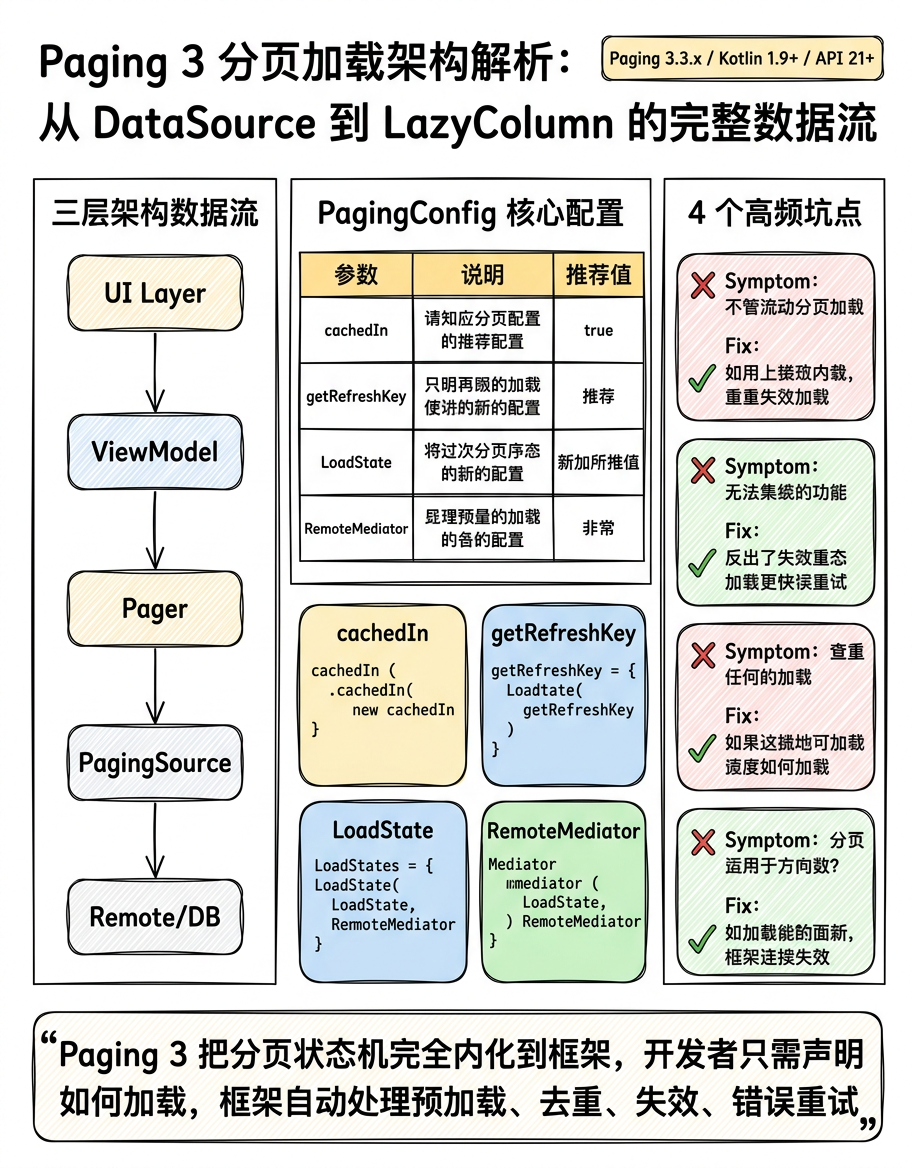
---
场景引入
你接手一个信息流页面:后端返回 cursor-based 分页接口,初始一切正常,但随着列表滚动,内存占用线性增长,滑回顶部时数据重新加载,网络错误后重试逻辑一片混乱——RecyclerView.Adapter 里塞满了 page、hasMore、isLoading 三个全局变量,互相掌控生命周期。这正是 Paging 3 要解决的问题域。
---
1. 核心架构:三层数据流
┌──────────────────────────────────────────────────────────────┐
│                      UI Layer                                │
│   LazyColumn / RecyclerView                                  │
│         ↑  collectAsLazyPagingItems()                        │
│   LazyPagingItems

     / PagingDataAdapter                     │

│         ↑  submitData()                                       │
│   ViewModel: Flow


     >                             │


└───────────────────────────┬──────────────────────────────────┘
│  Pager(...).flow
┌───────────────────────────▼──────────────────────────────────┐
│                   Paging Layer                               │
│   Pager  ──→  PagingSource

                           │

│               load(LoadParams) → LoadResult                  │
│                                                              │
│   RemoteMediator (可选)                                       │
│     loadSingle() → MediatorResult                            │
└───────────────────────────┬──────────────────────────────────┘
│
┌───────────────────────────▼──────────────────────────────────┐
│                  Repository / Data Layer                      │
│   Network: Retrofit / OkHttp                                 │
│   Local DB: Room PagingSource (自动生成)                      │
│   Cache: RemoteKeys 表(用于 RemoteMediator)                 │
└──────────────────────────────────────────────────────────────┘
三层职责边界极为清晰:
- PagingSource:单一数据源的加载逻辑,知道"如何加载第 N 页"。
- RemoteMediator:协调网络与数据库,实现离线优先(network + db 双源)。
- Pager / PagingConfig:控制预加载距离、页大小、初始加载量,驱动整条流水线。
---
2. PagingSource 深度解析
2.1 核心接口定义
PagingSource
是抽象类,位于
androidx.paging.PagingSource,两个核心方法:
abstract suspend fun load(params: LoadParams

   ): LoadResult


    abstract fun getRefreshKey(state: PagingState

      ): Key?
LoadParams 有三个子类对应三种加载类型:
- LoadParams.Refresh:初始加载或刷新
- LoadParams.Append:向后加载更多
- LoadParams.Prepend:向前加载(双向分页时使用)
2.2 基于 Cursor 的 PagingSource 实现
错误写法 → 问题 → 正确写法// ❌ 错误:直接暴露 Exception,未区分网络错误类型
class BadArticlePagingSource(private val api: ArticleApi) :
PagingSource
() {
override suspend fun load(params: LoadParams
): LoadResult
{
return try {
val cursor = params.key // 第一次加载时 key 为 null,这里会崩溃
val response = api.getArticles(cursor = cursor!!, limit = params.loadSize)
LoadResult.Page(
data = response.items,
prevKey = null,
nextKey = response.nextCursor
)
} catch (e: Exception) {
LoadResult.Error(e)
}
}
override fun getRefreshKey(state: PagingState
): String? = null
}
params.key 在初始 Refresh 时为
null,用
!! 直接崩溃;
getRefreshKey 返回
null 导致刷新后始终从第一页加载,滑到中间刷新后跳回顶部。
// ✅ 正确:处理 null key + 实现精准 getRefreshKey
class ArticlePagingSource(
private val api: ArticleApi,
private val initialCursor: String? = null
) : PagingSource

    () {


override suspend fun load(params: LoadParams

    ): LoadResult

      {


// params.key 为 null 时使用初始 cursor(第一次加载)
val cursor = params.key ?: initialCursor
return try {
val response = api.getArticles(
cursor = cursor,          // null 表示从头加载
limit = params.loadSize   // 框架自动处理 pageSize / initialLoadSize
)
LoadResult.Page(
data = response.items,
prevKey = null,           // cursor-based 通常不支持向前翻页
nextKey = if (response.hasMore) response.nextCursor else null
)
} catch (e: IOException) {
// 网络错误:允许重试
LoadResult.Error(e)
} catch (e: HttpException) {
// HTTP 错误:4xx/5xx 区分处理
LoadResult.Error(e)
}
}

// getRefreshKey 决定刷新时从哪里开始,实现"刷新不跳顶"
override fun getRefreshKey(state: PagingState

    ): String? {

// 找到当前可见区域附近的 page,从其 prevKey 或 nextKey 推算 refresh cursor
return state.anchorPosition?.let { anchor ->
val anchorPage = state.closestPageToPosition(anchor)
// 优先用 prevKey,其次用 nextKey 的前一页
anchorPage?.prevKey ?: anchorPage?.nextKey
}
}
}
2.3 PagingConfig 配置要点
val pager = Pager(
config = PagingConfig(
pageSize = 20,              // 每次 Append/Prepend 加载量
initialLoadSize = 40,       // 首次 Refresh 加载量,建议 2~3 倍 pageSize
prefetchDistance = 5,       // 距列表末尾多少条时触发预加载
enablePlaceholders = false  // 占位符:true 需要知道总数,cursor-based 通常 false
),
pagingSourceFactory = { ArticlePagingSource(api) }
)
---
3. RemoteMediator:网络 + 数据库双源架构
当需要离线缓存时,单纯的 PagingSource 不够用。RemoteMediator 充当"加载触发器",由框架在本地数据不足时自动调用。
3.1 RemoteMediator 工作原理
用户滚动到底部
│
▼
Room PagingSource 检测到数据不足
│
▼
框架调用 RemoteMediator.load(LoadType.APPEND, state)
│
├─→ 请求网络 API
│
├─→ 写入 Room(文章表 + RemoteKeys 表)
│
└─→ 返回 MediatorResult.Success(endOfPaginationReached = !hasMore)
│
▼
Room PagingSource 自动通知更新(Flow invalidation)
│
▼
UI 自动呈现新数据
3.2 RemoteKeys 表设计
@Entity(tableName = "remote_keys")
data class RemoteKey(
@PrimaryKey val articleId: String,
val prevKey: String?,   // 该条目所在页的 prevCursor
val nextKey: String?    // 该条目所在页的 nextCursor
)

@Dao
interface RemoteKeyDao {
@Insert(onConflict = OnConflictStrategy.REPLACE)
suspend fun insertAll(keys: List

    )


@Query("SELECT * FROM remote_keys WHERE articleId = :id")
suspend fun remoteKeyByArticleId(id: String): RemoteKey?

@Query("DELETE FROM remote_keys")
suspend fun clearAll()
}
3.3 RemoteMediator 完整实现
@OptIn(ExperimentalPagingApi::class)
class ArticleRemoteMediator(
private val api: ArticleApi,
private val db: ArticleDatabase
) : RemoteMediator

    () {


// initialize() 控制首次进入时是否强制刷新
override suspend fun initialize(): InitializeAction {
val cacheTimeout = TimeUnit.HOURS.toMillis(1)
return if (System.currentTimeMillis() - db.articleDao().lastUpdated() < cacheTimeout) {
InitializeAction.SKIP_INITIAL_REFRESH
} else {
InitializeAction.LAUNCH_INITIAL_REFRESH
}
}

override suspend fun load(
loadType: LoadType,
state: PagingState

): MediatorResult {
val cursor: String? = when (loadType) {
LoadType.REFRESH -> null
LoadType.PREPEND -> {
val remoteKey = state.pages.firstOrNull()?.data?.firstOrNull()
?.let { db.remoteKeyDao().remoteKeyByArticleId(it.id) }
remoteKey?.prevKey ?: return MediatorResult.Success(endOfPaginationReached = true)
}
LoadType.APPEND -> {
val remoteKey = state.pages.lastOrNull()?.data?.lastOrNull()
?.let { db.remoteKeyDao().remoteKeyByArticleId(it.id) }
remoteKey?.nextKey ?: return MediatorResult.Success(endOfPaginationReached = true)
}
}

return try {
val response = api.getArticles(cursor = cursor, limit = state.config.pageSize)
val endOfPagination = !response.hasMore

db.withTransaction {
if (loadType == LoadType.REFRESH) {
db.remoteKeyDao().clearAll()
db.articleDao().clearAll()
}
val keys = response.items.map { article ->
RemoteKey(
articleId = article.id,
prevKey = cursor,
nextKey = if (endOfPagination) null else response.nextCursor
)
}
db.remoteKeyDao().insertAll(keys)
db.articleDao().insertAll(response.items)
}
MediatorResult.Success(endOfPaginationReached = endOfPagination)
} catch (e: IOException) {
MediatorResult.Error(e)
} catch (e: HttpException) {
MediatorResult.Error(e)
}
}
}
---
4. ViewModel 与 Flow 集成
class ArticleViewModel(private val repository: ArticleRepository
) : ViewModel() {
// cachedIn(viewModelScope) 缓存 PagingData,避免屏幕旋转时重新请求网络
val articles: Flow
cachedIn 的重要性:不加
cachedIn,每次
collectAsLazyPagingItems() 重新订阅(如旋转屏幕、Fragment 重建)都会触发新的网络请求;加了之后
PagingData 在
viewModelScope 生命周期内被缓存,重新订阅直接复用内存中的数据。
4.1 结合搜索过滤器(避免重复订阅)
class ArticleViewModel(private val repository: ArticleRepository) : ViewModel() {private val searchQuery = MutableStateFlow("")
val articles: Flow
> = searchQuery.debounce(300)
.distinctUntilChanged()
.flatMapLatest { query ->
// flatMapLatest 取消前一个 Flow,只保留最新搜索结果
repository.getArticleStream(query)
}
.cachedIn(viewModelScope)
fun search(query: String) {
searchQuery.value = query
}
}
flatMapLatest vs flatMapMerge:搜索场景必须用
flatMapLatest——当用户快速输入时,旧搜索请求立即取消,否则旧结果可能在新结果之后到达,造成数据倒序显示的 bug。
---
5. Compose UI 层集成
5.1 LazyColumn + collectAsLazyPagingItems
@Composable
fun ArticleListScreen(viewModel: ArticleViewModel = hiltViewModel()) {
val articles = viewModel.articles.collectAsLazyPagingItems()

LazyColumn {
items(
count = articles.itemCount,
key = articles.itemKey { it.id }  // 提供稳定 key,避免不必要重组
) { index ->
val article = articles[index]
if (article != null) {
ArticleItem(article = article)
} else {
ArticlePlaceholder()
}
}

when (val state = articles.loadState.append) {
is LoadState.Loading -> item { LoadingIndicator() }
is LoadState.Error -> item {
ErrorItem(
message = state.error.localizedMessage ?: "加载失败",
onRetry = { articles.retry() }
)
}
is LoadState.NotLoading -> {
if (state.endOfPaginationReached) {
item { EndOfListIndicator() }
}
}
}
}

articles.loadState.refresh.let { refreshState ->
if (refreshState is LoadState.Error && articles.itemCount == 0) {
FullScreenError(
error = refreshState.error,
onRetry = { articles.refresh() }
)
}
}
}
5.2 刷新状态与 SwipeRefresh 联动
val isRefreshing by remember {
derivedStateOf {
articles.loadState.refresh is LoadState.Loading
}
}

SwipeRefresh(
state = rememberSwipeRefreshState(isRefreshing),
onRefresh = { articles.refresh() }
) {
// LazyColumn ...
}
---
6. 最佳实践
6.1 Room PagingSource 不要手写
Room 3.x 支持直接返回 PagingSource
,自动处理失效通知:
@Dao
interface ArticleDao {
// Room 自动生成 PagingSource,数据库变化时自动 invalidate
@Query("SELECT * FROM articles WHERE query = :query ORDER BY publishedAt DESC")
fun pagingSource(query: String): PagingSource

}
InvalidationTracker 监听,任何对
articles 表的写操作都会自动触发
invalidate(),通知 Pager 重新加载。手写版本需要自行实现这个机制,容易遗漏导致数据不刷新。
6.2 PagingData.map 做数据转换
val articles: Flow


    > = repository.getArticleStream()

    .map { pagingData ->

    pagingData.map { entity ->

    entity.toUiModel()  // Entity → UiModel,关注点分离

    }

    }

    .cachedIn(viewModelScope)
DiffUtil 正确识别(对象引用不稳定),导致列表频繁整体刷新。
6.3 正确处理 endOfPaginationReached
LoadResult.Page(
data = items,
prevKey = null,
// 只有真正没有更多数据时才返回 null
nextKey = if (response.items.isEmpty() || !response.hasMore) null else response.nextCursor
)
nextKey = null,Pager 认为分页结束,不再触发 APPEND 加载,用户看到的列表被截断但不知原因。
---
7. 常见陷阱
陷阱 1:多次 collect 导致多份网络请求
症状:同一个列表发出了多条相同 API 请求,日志里看到重复的网络调用。 原因:多个地方collectAsLazyPagingItems() 订阅了同一个
Flow
,但没有
cachedIn,每次订阅都创建新的
Pager 实例。
复现:在两个不同 Composable 中订阅同一 ViewModel 的
articles Flow,去掉
cachedIn。
解决:在 ViewModel 声明处加
.cachedIn(viewModelScope),保证 Flow 是热流,所有订阅者共享同一份数据。
陷阱 2:数据库刷新后 UI 不更新
症状:调用articles.refresh() 后,网络请求成功,数据库写入了新数据,但 UI 列表没有变化。
原因:手写了
PagingSource 但未在数据写入后调用
invalidate();或者 Room DAO 返回的
PagingSource 查询条件与写入数据的表不匹配(查询 view,更新 table,未触发 tracker)。
解决:
// 在 RemoteMediator 写入数据库后,Room 自动触发 invalidate
// 如果是手写 PagingSource,在 DAO 写入后手动调用:
pagingSourceFactory.invalidate()
陷阱 3:Compose 中 key 缺失导致列表抖动
症状:加载更多后,已有 item 发生闪烁或位置跳动。 原因:items() 未提供
key 参数,Compose 用位置 index 作为默认 key,新数据插入后所有 item 的 index 变化,触发全量重组。
解决:
items(
count = articles.itemCount,
key = articles.itemKey { article -> article.id }  // 用业务 ID 作为稳定 key
) { index -> ... }
陷阱 4:LoadState 状态机理解错误
症状:在 append 加载完成后,endOfPaginationReached 一直为
false,底部始终显示"加载中"。
原因:混淆了
loadState.append.endOfPaginationReached(布尔属性,仅在
NotLoading 时有意义)和
loadState.append is LoadState.NotLoading(状态判断)。
// ❌ 错误用法:直接访问 endOfPaginationReached,未检查状态类型
if (articles.loadState.append.endOfPaginationReached) { ... }

// ✅ 正确用法:先确认是 NotLoading 状态,再读取标志位
val appendState = articles.loadState.append
if (appendState is LoadState.NotLoading && appendState.endOfPaginationReached) {
// 真正到达末尾
}
---
8. 总结
1. 三层分离是核心:PagingSource 负责加载,ViewModel 负责缓存,UI 层只订阅状态——任何一层的职责泄漏都会导致难以排查的 bug。
2. cachedIn 不可省:屏幕旋转、Fragment 重建场景下,缺少 cachedIn 是最常见的性能问题根源。
3. getRefreshKey 决定用户体验:实现精准的 getRefreshKey 让用户刷新后停留在原位,而不是跳回顶部。
4. 区分 refresh / append / prepend 错误:三种 LoadState 应对应不同 UI 策略,不能混用。
5. Room 生成 PagingSource > 手写:利用 Room 的 InvalidationTracker 机制获得自动失效通知,是最可靠的本地分页方案。
---
参考资料
- AOSP 源码路径:frameworks/support/paging/paging-runtime/src/main/java/androidx/paging/
- PagingSource.kt
- RemoteMediator.kt
- Pager.kt
- PagingDataDiffer.kt(UI 层差分引擎)

脑启社区是一个专注类脑智能领域的开发者社区。欢迎加入社区,共建类脑智能生态。社区为开发者提供了丰富的开源类脑工具软件、类脑算法模型及数据集、类脑知识库、类脑技术培训课程以及类脑应用案例等资源。
更多推荐



 5
5 0
0- 0


 已为社区贡献1条内容

所有评论(0)