基于零售数据集的消费者购物数据分析
但是,神经网络在类别1的识别优势不是特别大,在考虑随机森林具有较强解释性(例如给出的重要性排序图)的情况下,这点优势可以忽略,所以综合对比分析可以得到,在执行探索性数据分析、创建可视化还是训练机器学习模型,该数据集都能提供有价值的见解,以支持零售业的数据驱动决策。各属性的数值类型正确,即数值型数据均为对应数值类型,其他为object类型。#综合考虑多维度交叉分析,以年龄区间和消费金额区间交叉为例。
关于数据
数据集获取请评论区留言
该数据集提供了消费者购物趋势的全面视图,旨在揭示零售购买的模式和行为。它包含各种产品类别、客户人口统计和购买渠道的详细交易数据。主要功能可能包括:
- 交易详情:购买日期、交易价值、产品类别和付款方式。
- 客户信息:年龄组、性别、位置和忠诚度状态。
- 购物行为:购买频率、每笔交易的平均支出和季节性趋势。
这个数据集对于数据科学家、分析师和营销人员来说是理想的选择:
- 随着时间的推移分析消费者的购买模式。
- 确定流行的产品类别和高绩效细分市场。
- 制定客户细分和个性化策略。
- 为销售预测或客户保留建立预测模型。
在执行探索性数据分析、创建可视化还是训练机器学习模型,该数据集都能提供有价值的见解,以支持零售业的数据驱动决策。
评论
数据预处理
In [29]:
import pandas as pd
import numpy as np
import seaborn as sns
import matplotlib.pyplot as plt
import warnings

warnings.filterwarnings('ignore')
In [30]:
df = pd.read_csv("./shopping_trends.csv")
In [31]:
df.head()
| Customer ID | Age | Gender | Item Purchased | Category | Purchase Amount (USD) | Location | Size | Color | Season | Review Rating | Subscription Status | Payment Method | Shipping Type | Discount Applied | Promo Code Used | Previous Purchases | Preferred Payment Method | Frequency of Purchases | |
|---|---|---|---|---|---|---|---|---|---|---|---|---|---|---|---|---|---|---|---|
| 0 | 1 | 55 | Male | Blouse | Clothing | 53 | Kentucky | L | Gray | Winter | 3.1 | Yes | Credit Card | Express | Yes | Yes | 14 | Venmo | Fortnightly |
| 1 | 2 | 19 | Male | Sweater | Clothing | 64 | Maine | L | Maroon | Winter | 3.1 | Yes | Bank Transfer | Express | Yes | Yes | 2 | Cash | Fortnightly |
| 2 | 3 | 50 | Male | Jeans | Clothing | 73 | Massachusetts | S | Maroon | Spring | 3.1 | Yes | Cash | Free Shipping | Yes | Yes | 23 | Credit Card | Weekly |
| 3 | 4 | 21 | Male | Sandals | Footwear | 90 | Rhode Island | M | Maroon | Spring | 3.5 | Yes | PayPal | Next Day Air | Yes | Yes | 49 | PayPal | Weekly |
| 4 | 5 | 45 | Male | Blouse | Clothing | 49 | Oregon | M | Turquoise | Spring | 2.7 | Yes | Cash | Free Shipping | Yes | Yes | 31 | PayPal | Annually |
In [32]:
df.info()
<class 'pandas.core.frame.DataFrame'>
RangeIndex: 3900 entries, 0 to 3899
Data columns (total 19 columns):
 #   Column                    Non-Null Count  Dtype
---  ------                    --------------  -----
 0   Customer ID               3900 non-null   int64
 1   Age                       3900 non-null   int64
 2   Gender                    3900 non-null   object
 3   Item Purchased            3900 non-null   object
 4   Category                  3900 non-null   object
 5   Purchase Amount (USD)     3900 non-null   int64
 6   Location                  3900 non-null   object
 7   Size                      3900 non-null   object
 8   Color                     3900 non-null   object
 9   Season                    3900 non-null   object
 10  Review Rating             3900 non-null   float64
 11  Subscription Status       3900 non-null   object
 12  Payment Method            3900 non-null   object
 13  Shipping Type             3900 non-null   object
 14  Discount Applied          3900 non-null   object
 15  Promo Code Used           3900 non-null   object
 16  Previous Purchases        3900 non-null   int64
 17  Preferred Payment Method  3900 non-null   object
 18  Frequency of Purchases    3900 non-null   object
dtypes: float64(1), int64(4), object(14)
memory usage: 579.0+ KB
各属性的数值类型正确,即数值型数据均为对应数值类型,其他为object类型
In [33]:
df.isnull().sum()
Customer ID                 0
Age                         0
Gender                      0
Item Purchased              0
Category                    0
Purchase Amount (USD)       0
Location                    0
Size                        0
Color                       0
Season                      0
Review Rating               0
Subscription Status         0
Payment Method              0
Shipping Type               0
Discount Applied            0
Promo Code Used             0
Previous Purchases          0
Preferred Payment Method    0
Frequency of Purchases      0
dtype: int64
无缺失值
数据分析
1.简单统计分析
(1)描述性统计
In [34]:
df.describe().drop('Customer ID', axis=1)
| Age | Purchase Amount (USD) | Review Rating | Previous Purchases | |
|---|---|---|---|---|
| count | 3900.000000 | 3900.000000 | 3900.000000 | 3900.000000 |
| mean | 44.068462 | 59.764359 | 3.749949 | 25.351538 |
| std | 15.207589 | 23.685392 | 0.716223 | 14.447125 |
| min | 18.000000 | 20.000000 | 2.500000 | 1.000000 |
| 25% | 31.000000 | 39.000000 | 3.100000 | 13.000000 |
| 50% | 44.000000 | 60.000000 | 3.700000 | 25.000000 |
| 75% | 57.000000 | 81.000000 | 4.400000 | 38.000000 |
| max | 70.000000 | 100.000000 | 5.000000 | 50.000000 |
对除'Customer ID'之外的数值型属性进行描述性分析:
- 年龄分布:客户年龄分布较广,但主要集中在31岁到57岁之间,平均数与中位数均为44岁,说明中年人群是主要客户群体。
- 购买金额:购买金额的波动较大,可能与购买的商品种类、数量或促销活动有关。
- 评价评分:客户的评价普遍较高,评分集中在3.1分到4.4分之间,表明客户满意度较好。
- 购买频率:客户的购买频率差异较大,中位数与平均数均为25次,说明频繁购买客户较多。
In [35]:
df
| Customer ID | Age | Gender | Item Purchased | Category | Purchase Amount (USD) | Location | Size | Color | Season | Review Rating | Subscription Status | Payment Method | Shipping Type | Discount Applied | Promo Code Used | Previous Purchases | Preferred Payment Method | Frequency of Purchases | |
|---|---|---|---|---|---|---|---|---|---|---|---|---|---|---|---|---|---|---|---|
| 0 | 1 | 55 | Male | Blouse | Clothing | 53 | Kentucky | L | Gray | Winter | 3.1 | Yes | Credit Card | Express | Yes | Yes | 14 | Venmo | Fortnightly |
| 1 | 2 | 19 | Male | Sweater | Clothing | 64 | Maine | L | Maroon | Winter | 3.1 | Yes | Bank Transfer | Express | Yes | Yes | 2 | Cash | Fortnightly |
| 2 | 3 | 50 | Male | Jeans | Clothing | 73 | Massachusetts | S | Maroon | Spring | 3.1 | Yes | Cash | Free Shipping | Yes | Yes | 23 | Credit Card | Weekly |
| 3 | 4 | 21 | Male | Sandals | Footwear | 90 | Rhode Island | M | Maroon | Spring | 3.5 | Yes | PayPal | Next Day Air | Yes | Yes | 49 | PayPal | Weekly |
| 4 | 5 | 45 | Male | Blouse | Clothing | 49 | Oregon | M | Turquoise | Spring | 2.7 | Yes | Cash | Free Shipping | Yes | Yes | 31 | PayPal | Annually |
| ... | ... | ... | ... | ... | ... | ... | ... | ... | ... | ... | ... | ... | ... | ... | ... | ... | ... | ... | ... |
| 3895 | 3896 | 40 | Female | Hoodie | Clothing | 28 | Virginia | L | Turquoise | Summer | 4.2 | No | Cash | 2-Day Shipping | No | No | 32 | Venmo | Weekly |
| 3896 | 3897 | 52 | Female | Backpack | Accessories | 49 | Iowa | L | White | Spring | 4.5 | No | PayPal | Store Pickup | No | No | 41 | Bank Transfer | Bi-Weekly |
| 3897 | 3898 | 46 | Female | Belt | Accessories | 33 | New Jersey | L | Green | Spring | 2.9 | No | Credit Card | Standard | No | No | 24 | Venmo | Quarterly |
| 3898 | 3899 | 44 | Female | Shoes | Footwear | 77 | Minnesota | S | Brown | Summer | 3.8 | No | PayPal | Express | No | No | 24 | Venmo | Weekly |
| 3899 | 3900 | 52 | Female | Handbag | Accessories | 81 | California | M | Beige | Spring | 3.1 | No | Bank Transfer | Store Pickup | No | No | 33 | Venmo | Quarterly |
3900 rows × 19 columns
(2)数值型数据的相关性分析
In [36]:
# 数值型数据相关性
corr = df[['Age', 'Purchase Amount (USD)','Review Rating', 'Previous Purchases']].corr()

plt.figure(figsize=(8, 6))
sns.heatmap(corr, annot=True, cmap='Purples', fmt='.2f', linewidths=0.5)
plt.title('Correlation Heatmap')
plt.show()
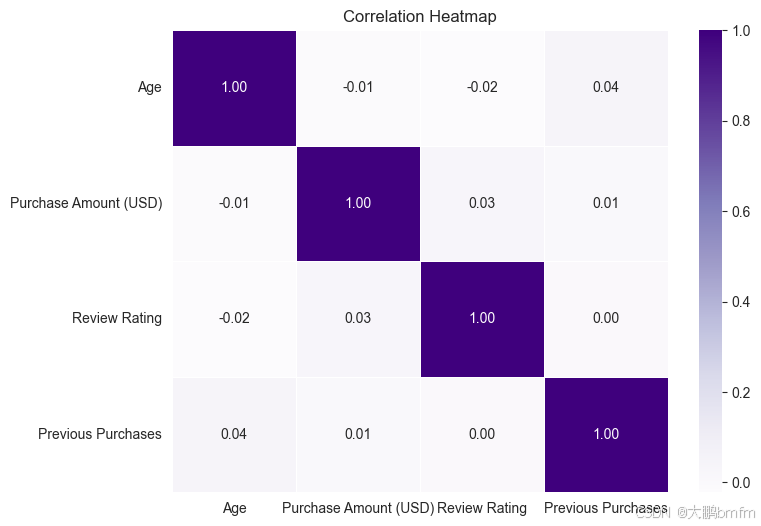
根据热力图结果可以发现,其中数值型数据之间并不存在明显相关性,即Age,Purchase Amount (USD),Review Rating,Previous Purchase之间无明显相关性
2.商品类别
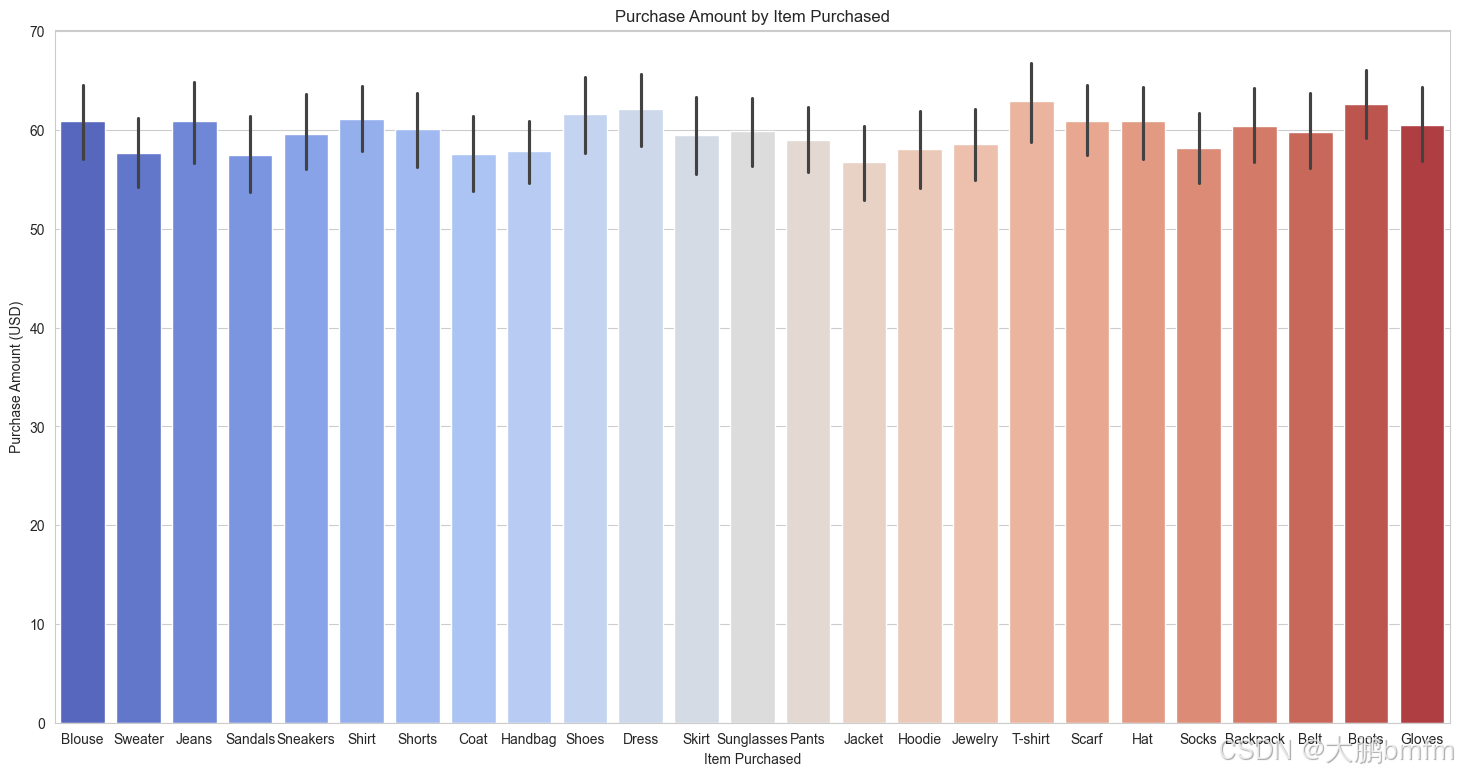
(1)各项商品与金额
In [37]:
plt.figure(figsize=(18, 9))
sns.barplot(x='Item Purchased', y='Purchase Amount (USD)', data=df, palette='coolwarm')
plt.title('Purchase Amount by Item Purchased')
plt.show()
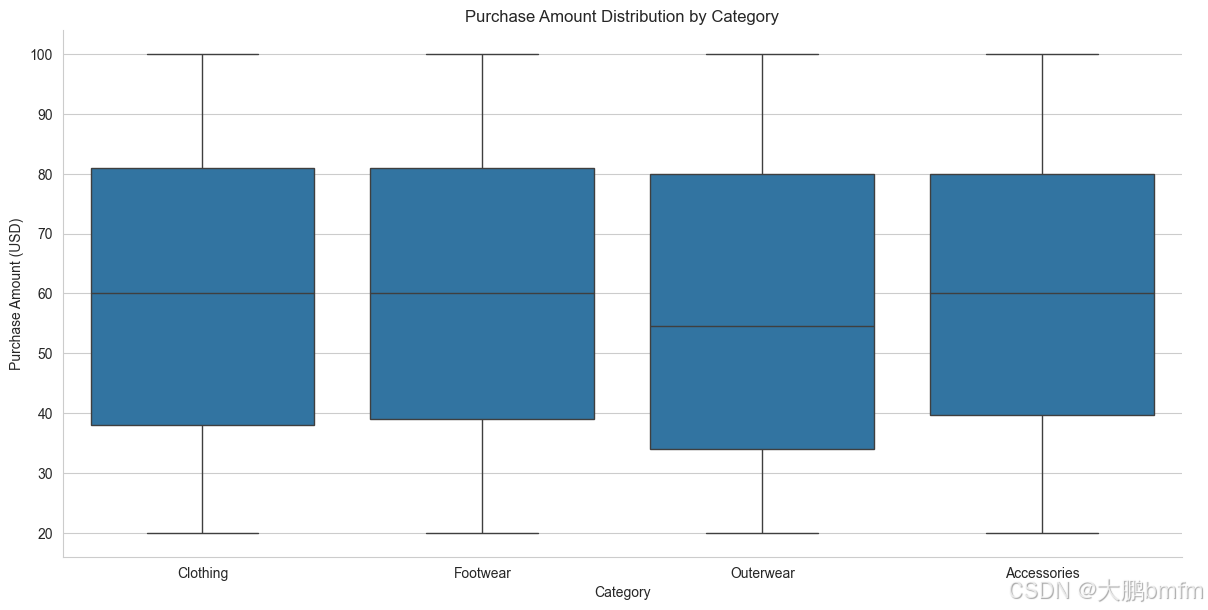
(2)商品类别与金额——箱型图
In [38]:
sns.catplot(data=df, x='Category', y='Purchase Amount (USD)', kind='box', height=6, aspect=2)
plt.title("Purchase Amount Distribution by Category")
plt.show()
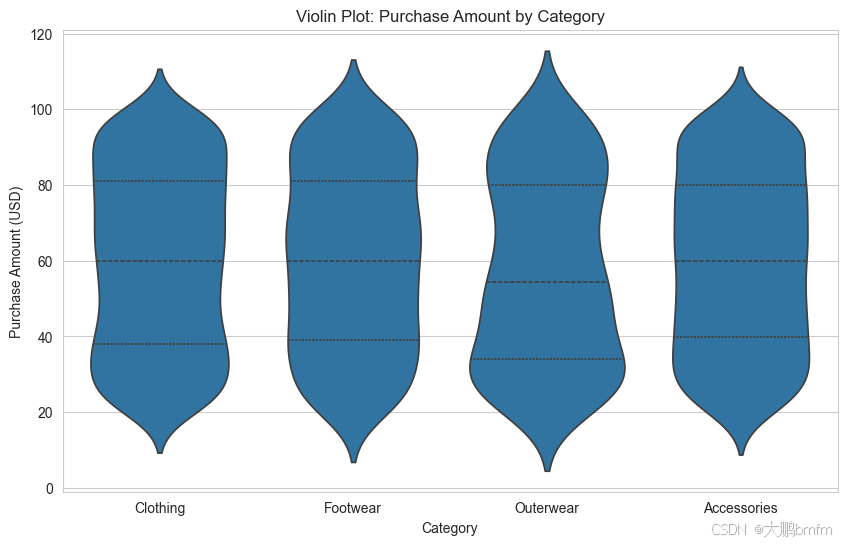
(3)商品类别与金额——小提琴图
In [39]:
plt.figure(figsize=(10, 6))
sns.violinplot(x='Category', y='Purchase Amount (USD)', data=df, inner='quart')
plt.title("Violin Plot: Purchase Amount by Category")
plt.show()
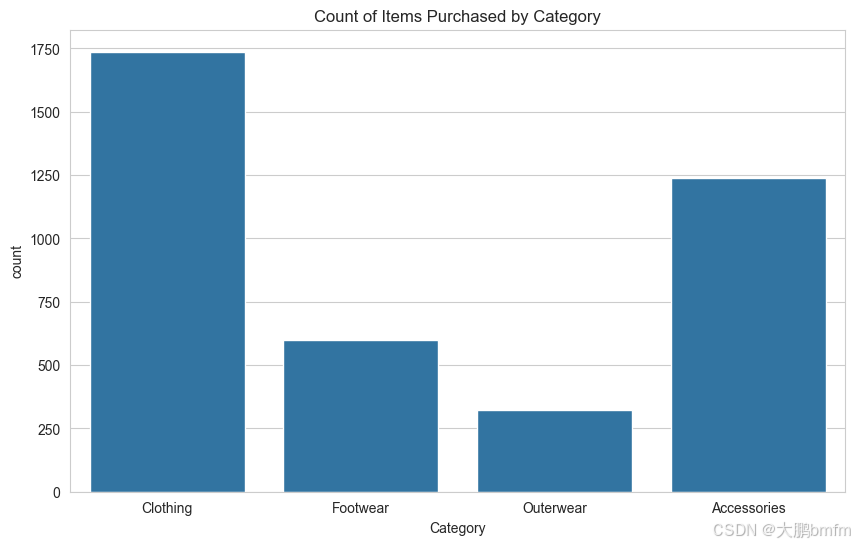
(4)商品类别与数量
In [40]:
plt.figure(figsize=(10, 6))
sns.countplot(x='Category', data=df)
plt.title('Count of Items Purchased by Category')
plt.show()
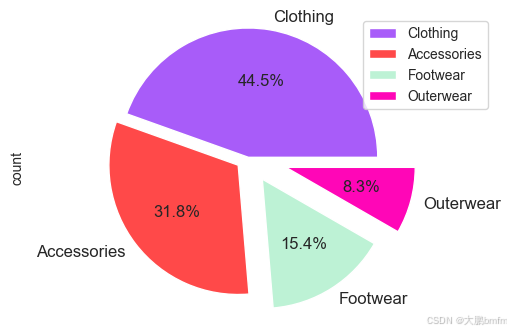
(5)购买频率占比
In [41]:
plt.figure(figsize=(6, 4))
counts = df['Category'].value_counts()
explode = (0, 0.1, 0.2, 0.3)

colors = ['#A85CF9', '#FF4949', '#BDF2D5', '#FF06B7', '#4B7BE5', '#FF5D5D', '#FAC213', '#37E2D5', '#6D8B74', '#E9D5CA']

counts.plot(kind='pie', fontsize=12, colors=colors, explode=explode, autopct='%1.1f%%')
plt.axis('equal')
plt.legend(labels=counts.index, loc='best')
plt.show()
(6)各产品销量
In [42]:
def barw(ax):
    for p in ax.patches:
        val = p.get_width()
        x = p.get_x() + p.get_width()
        y = p.get_y() + p.get_height() / 2
        ax.annotate(int(val), (x, y))


plt.figure(figsize=(16, 9))
# 获取不同商品的数量
item_counts = df['Item Purchased'].value_counts()
# 生成颜色列表
colors = sns.color_palette("hls", len(item_counts))
ax0 = sns.countplot(data=df, y='Item Purchased', order=df['Item Purchased'].value_counts().index, palette=colors)

# 计算购买次数均值
mean_count = df['Item Purchased'].value_counts().mean()
# 添加红色虚线表示均值
line = ax0.axvline(mean_count, color='r', linestyle='--')
barw(ax0)
# 添加图例
ax0.legend([line], [f'avg_count={mean_count:.2f}'])

plt.show()
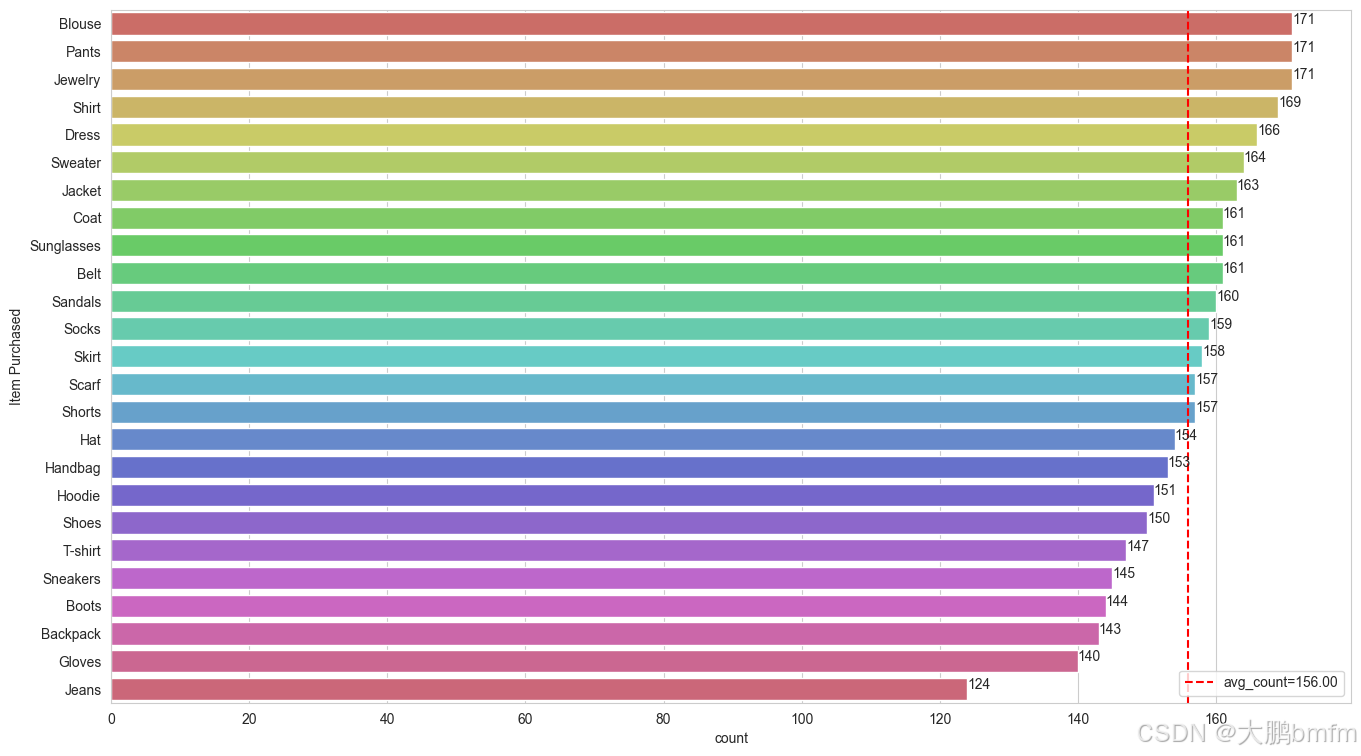
In [43]:
# 筛选出购买次数大于均值的商品,并按照购买次数降序排列
above_mean_items = item_counts[item_counts > mean_count].sort_values(ascending=False).reset_index()
above_mean_items.columns = ['Item Purchased', 'Purchase Times']
# 按照指定格式输出
result = above_mean_items.apply(lambda x: f"{x['Item Purchased']}({x['Purchase Times']})", axis=1)
result.tolist()
['Blouse(171)',
 'Pants(171)',
 'Jewelry(171)',
 'Shirt(169)',
 'Dress(166)',
 'Sweater(164)',
 'Jacket(163)',
 'Coat(161)',
 'Sunglasses(161)',
 'Belt(161)',
 'Sandals(160)',
 'Socks(159)',
 'Skirt(158)',
 'Scarf(157)',
 'Shorts(157)']
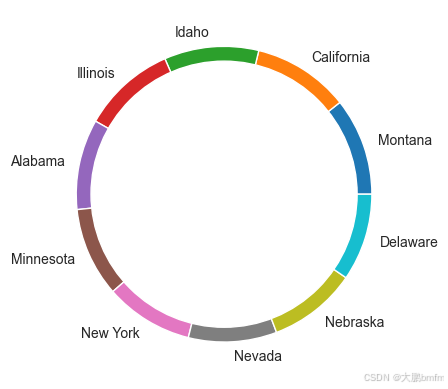
3.位置信息
In [44]:
# 统计Location列每个值出现的次数
location_counts = df['Location'].value_counts()

# 取前十个最常见的值及其计数
top_10_locations = location_counts[:10]

# 计算每个位置的占比
total_count = top_10_locations.sum()
ratios = top_10_locations / total_count

# 创建包含地理位置和比例的数据框
pd.DataFrame({'Location': top_10_locations.index, 'Ratio': ratios})
| Location | Ratio | |
|---|---|---|
| Location | ||
| Montana | Montana | 0.106667 |
| California | California | 0.105556 |
| Idaho | Idaho | 0.103333 |
| Illinois | Illinois | 0.102222 |
| Alabama | Alabama | 0.098889 |
| Minnesota | Minnesota | 0.097778 |
| New York | New York | 0.096667 |
| Nevada | Nevada | 0.096667 |
| Nebraska | Nebraska | 0.096667 |
| Delaware | Delaware | 0.095556 |
可以看出各个地方占比十分接近
In [45]:
my_circle = plt.Circle((0, 0), 0.9, color='white')

plt.pie(df['Location'].value_counts()[:10].values,
        labels=df['Location'].value_counts()[:10].index)

p = plt.gcf()
p.gca().add_artist(my_circle)
plt.show()
4.性别对比
(1)男女购买金额对比
In [46]:
plt.figure(figsize=(11, 5))
plt.gcf().text(0.55, 0.95, "Box Plot", fontsize=40, color='Red', ha='center', va='center')

sns.boxenplot(x=df['Gender'], y=df['Purchase Amount (USD)'], palette="Set1")

plt.show()
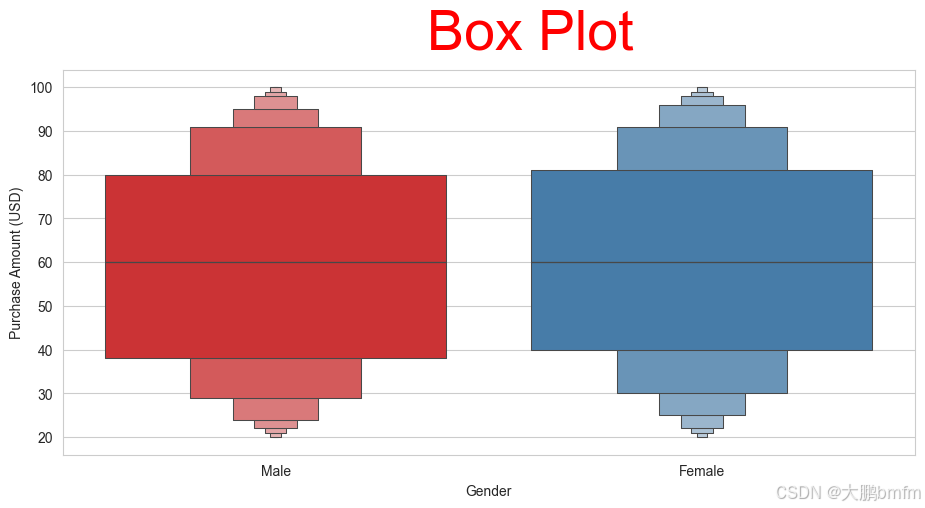
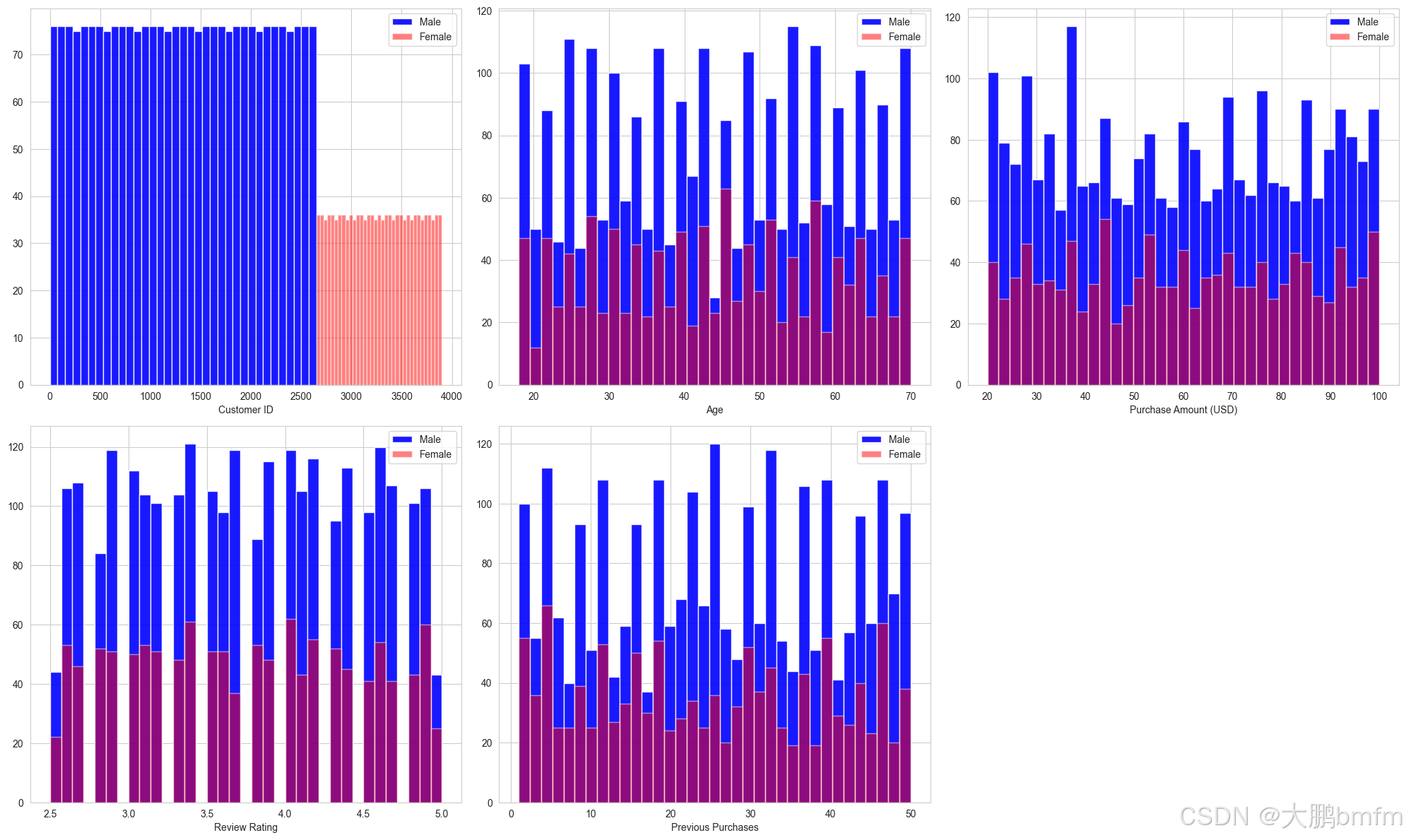
(2)男女定量数据分布对比
In [47]:
import math
# 统计符合条件的列的数量
count = sum(1 for col in df.columns if df[col].dtype in ['int64', 'float64'])
# 计算行数和列数
cols = math.ceil(math.sqrt(count))
rows = math.ceil(count / cols)

plt.figure(figsize=(20, 12))

i = 1
for column in df.columns:
    if df[column].dtype in ['int64', 'float64']:
        plt.subplot(rows, cols, i)
        df[df['Gender'] == 'Male'][column].hist(bins=35, color='blue', label='Male', alpha=0.9)
        df[df['Gender'] == 'Female'][column].hist(bins=35, color='red', label='Female', alpha=0.5)

        plt.legend()
        plt.xlabel(column)
        i += 1

plt.tight_layout()
plt.show()
In [48]:
df
| Customer ID | Age | Gender | Item Purchased | Category | Purchase Amount (USD) | Location | Size | Color | Season | Review Rating | Subscription Status | Payment Method | Shipping Type | Discount Applied | Promo Code Used | Previous Purchases | Preferred Payment Method | Frequency of Purchases | |
|---|---|---|---|---|---|---|---|---|---|---|---|---|---|---|---|---|---|---|---|
| 0 | 1 | 55 | Male | Blouse | Clothing | 53 | Kentucky | L | Gray | Winter | 3.1 | Yes | Credit Card | Express | Yes | Yes | 14 | Venmo | Fortnightly |
| 1 | 2 | 19 | Male | Sweater | Clothing | 64 | Maine | L | Maroon | Winter | 3.1 | Yes | Bank Transfer | Express | Yes | Yes | 2 | Cash | Fortnightly |
| 2 | 3 | 50 | Male | Jeans | Clothing | 73 | Massachusetts | S | Maroon | Spring | 3.1 | Yes | Cash | Free Shipping | Yes | Yes | 23 | Credit Card | Weekly |
| 3 | 4 | 21 | Male | Sandals | Footwear | 90 | Rhode Island | M | Maroon | Spring | 3.5 | Yes | PayPal | Next Day Air | Yes | Yes | 49 | PayPal | Weekly |
| 4 | 5 | 45 | Male | Blouse | Clothing | 49 | Oregon | M | Turquoise | Spring | 2.7 | Yes | Cash | Free Shipping | Yes | Yes | 31 | PayPal | Annually |
| ... | ... | ... | ... | ... | ... | ... | ... | ... | ... | ... | ... | ... | ... | ... | ... | ... | ... | ... | ... |
| 3895 | 3896 | 40 | Female | Hoodie | Clothing | 28 | Virginia | L | Turquoise | Summer | 4.2 | No | Cash | 2-Day Shipping | No | No | 32 | Venmo | Weekly |
| 3896 | 3897 | 52 | Female | Backpack | Accessories | 49 | Iowa | L | White | Spring | 4.5 | No | PayPal | Store Pickup | No | No | 41 | Bank Transfer | Bi-Weekly |
| 3897 | 3898 | 46 | Female | Belt | Accessories | 33 | New Jersey | L | Green | Spring | 2.9 | No | Credit Card | Standard | No | No | 24 | Venmo | Quarterly |
| 3898 | 3899 | 44 | Female | Shoes | Footwear | 77 | Minnesota | S | Brown | Summer | 3.8 | No | PayPal | Express | No | No | 24 | Venmo | Weekly |
| 3899 | 3900 | 52 | Female | Handbag | Accessories | 81 | California | M | Beige | Spring | 3.1 | No | Bank Transfer | Store Pickup | No | No | 33 | Venmo | Quarterly |
3900 rows × 19 columns
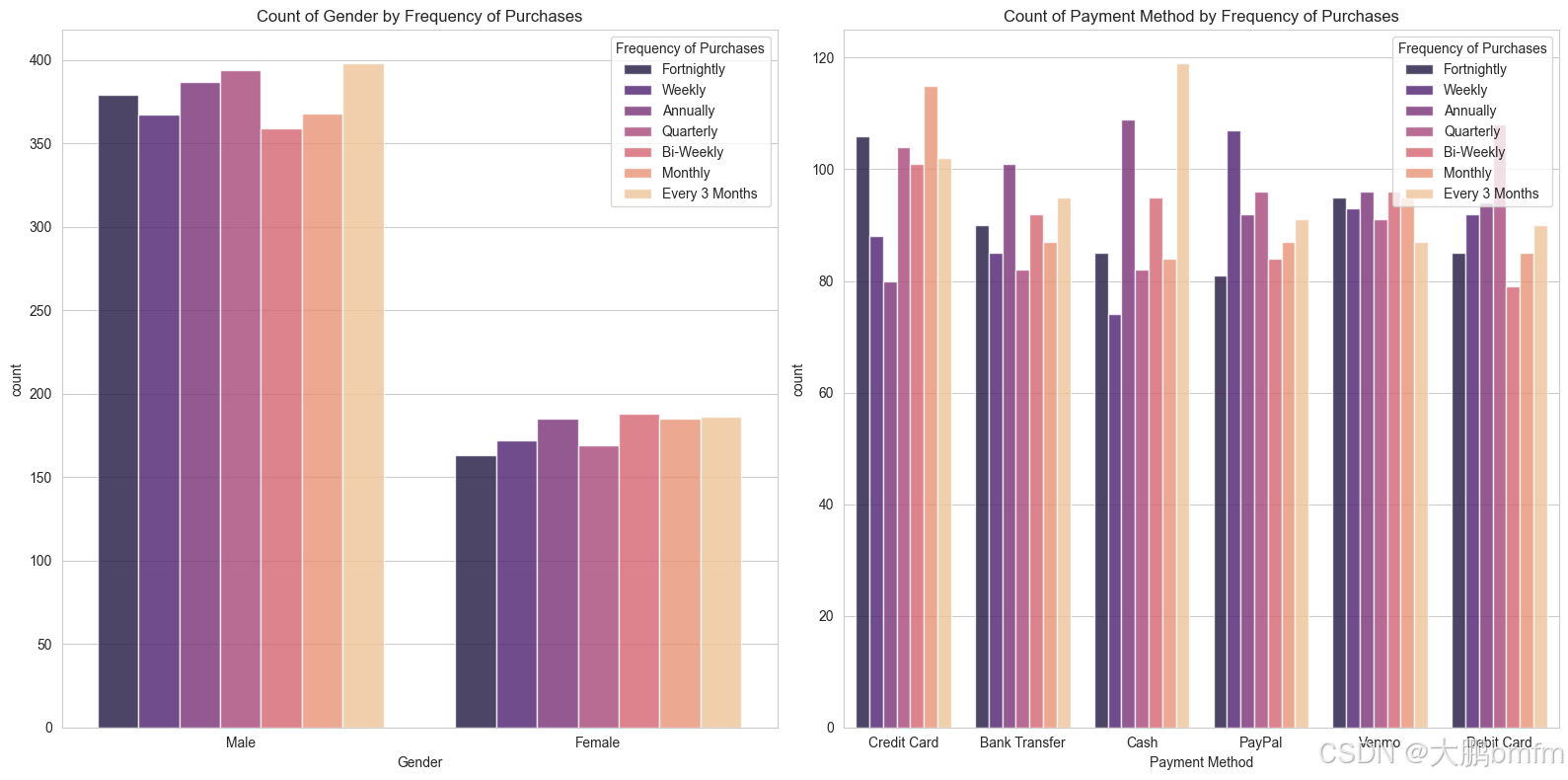
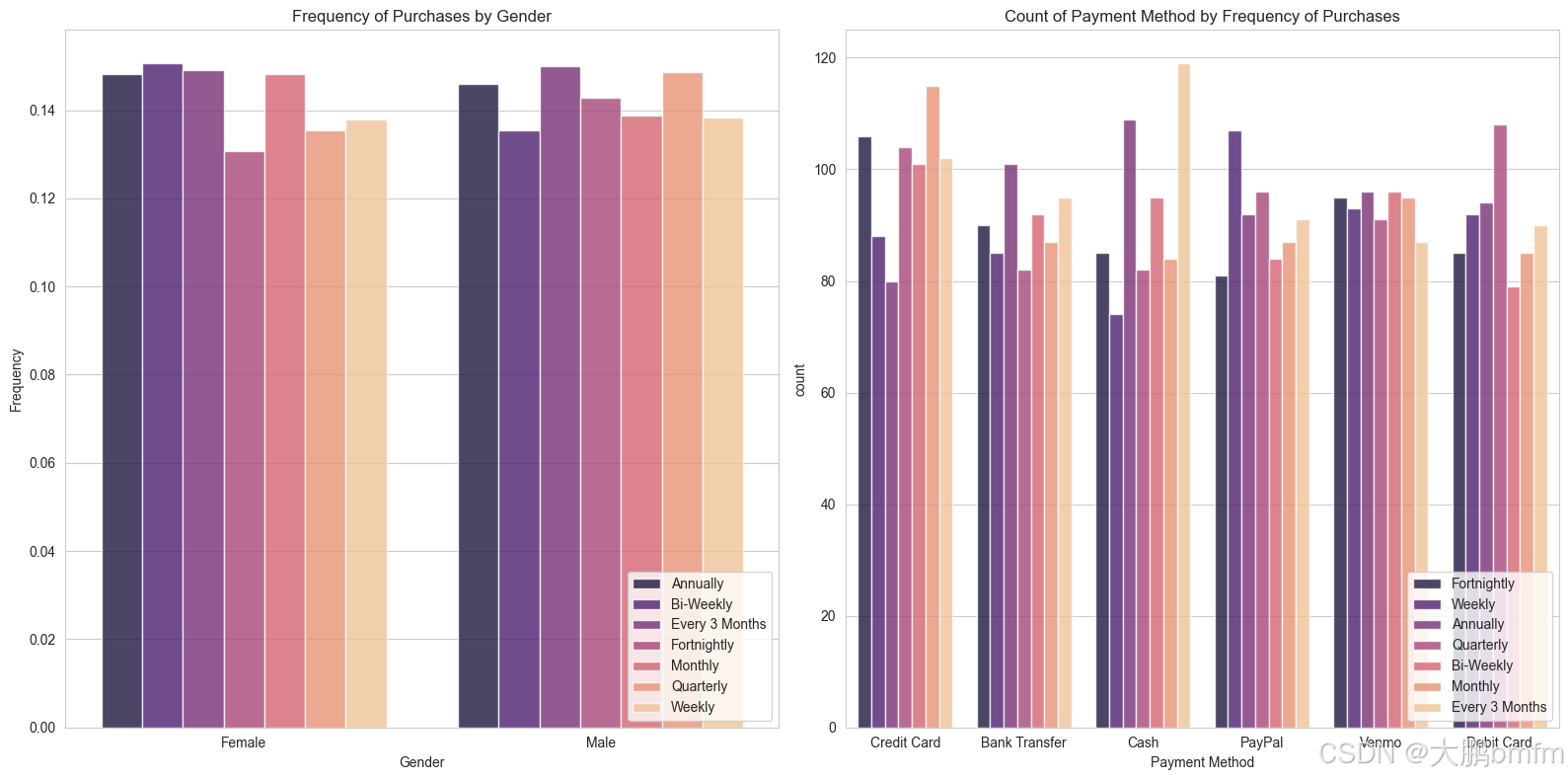
(3)购买频率与性别、支付方式
In [49]:
cat = ['Gender', 'Payment Method']

fig, ax = plt.subplots(1, 2, figsize=(16, 8))

for indx, (column, axes) in list(enumerate(list(zip(cat, ax.flatten())))):
    sns.countplot(ax=axes, x=df[column], hue=df['Frequency of Purchases'], palette='magma', alpha=0.8)
    axes.set_title(f'Count of {column} by Frequency of Purchases')

if len(cat) < len(ax.flatten()):
    [axes.set_visible(False) for axes in ax.flatten()[len(cat):]]

plt.tight_layout()
plt.show()
In [50]:
cat = ['Gender', 'Payment Method']

fig, ax = plt.subplots(1, 2, figsize=(16, 8))

for indx, (column, axes) in enumerate(zip(cat, ax.flatten())):
    if column == 'Gender':
        # 按性别分组并计算各购买频率的比例
        gender_counts = df.groupby(['Gender', 'Frequency of Purchases']).size().reset_index(name='count')
        total_per_gender = df.groupby('Gender').size().reset_index(name='total')
        gender_merged = gender_counts.merge(total_per_gender, on='Gender')
        gender_merged['frequency'] = gender_merged['count'] / gender_merged['total']

        sns.barplot(ax=axes, x='Gender', y='frequency', hue='Frequency of Purchases', data=gender_merged, palette='magma', alpha=0.8)
        axes.set_title(f'Frequency of Purchases by {column}')
        axes.set_ylabel('Frequency')
    else:
        sns.countplot(ax=axes, x=df[column], hue=df['Frequency of Purchases'], palette='magma', alpha=0.8)
        axes.set_title(f'Count of {column} by Frequency of Purchases')
    # 将图例放在右下角
    axes.legend(loc='lower right')

if len(cat) < len(ax.flatten()):
    [axes.set_visible(False) for axes in ax.flatten()[len(cat):]]

plt.tight_layout()
plt.show()
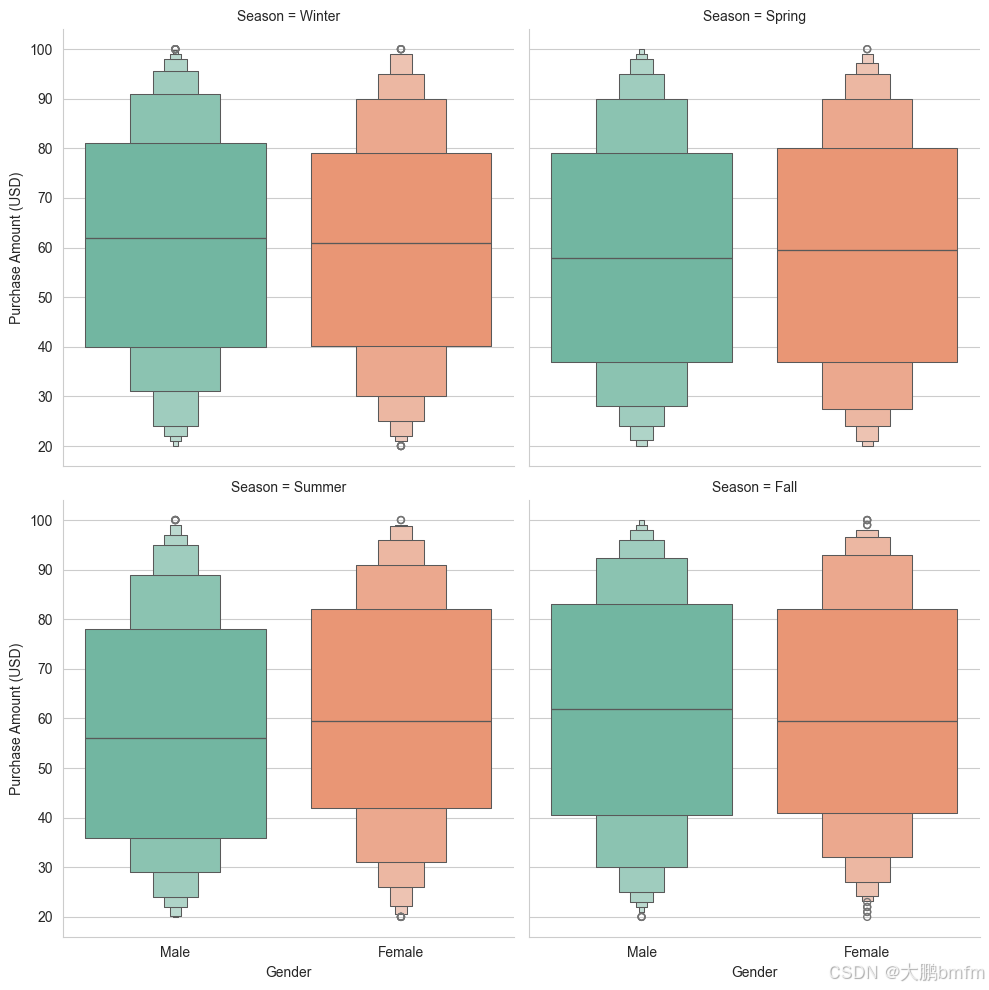
(4)不同季节男女消费金额
In [51]:
sns.catplot(x="Gender", y="Purchase Amount (USD)", col="Season",
            kind="boxen", palette="Set2", height=5, aspect=1, data=df, col_wrap=2)
plt.show()
(5)对不同产品的消费金额对比
In [52]:
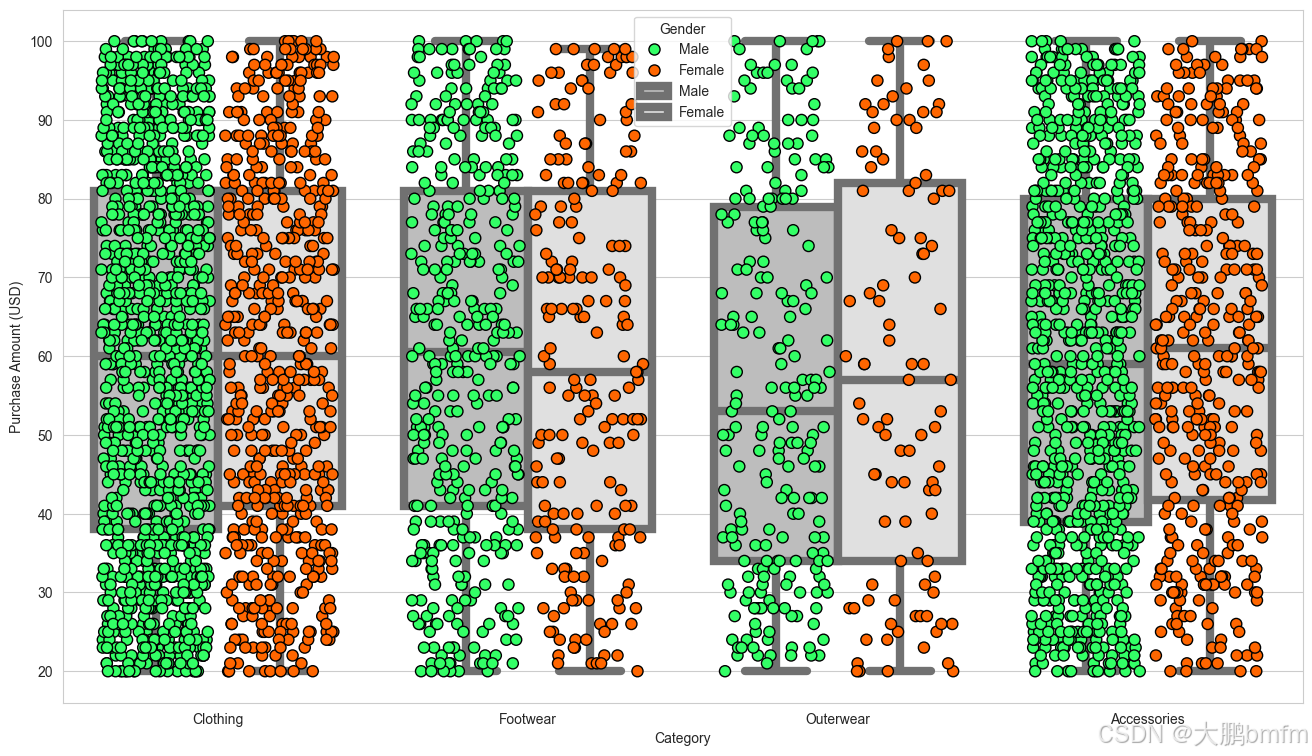
plt.figure(figsize=(16, 9))
params = dict(data=df, x='Category', y='Purchase Amount (USD)', hue='Gender', dodge=True)

# 散点图
sns.stripplot(**params, size=8, jitter=0.35, palette=['#33FF66', '#FF6600'], edgecolor='black', linewidth=1)
# 箱型图
sns.boxplot(**params, palette=['#BDBDBD', '#E0E0E0'], linewidth=6)

plt.show()
(6)不同性别不同年龄购买频率
In [53]:
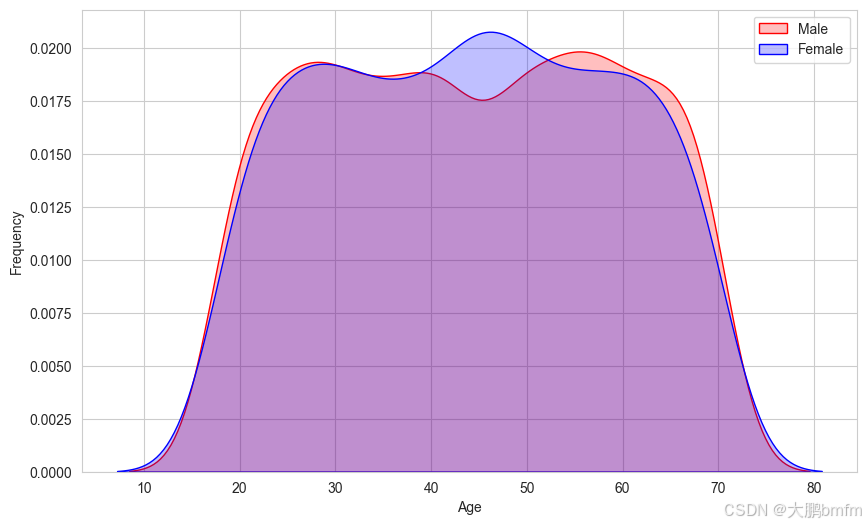
y = df['Gender']

plt.figure(figsize=(10, 6))
g = sns.kdeplot(df["Age"][(y == 'Male') & (df["Age"].notnull())], color="Red", shade=True)
g = sns.kdeplot(df["Age"][(y == 'Female') & (df["Age"].notnull())], ax=g, color="Blue", shade=True)
g.set_xlabel("Age")
g.set_ylabel("Frequency")
g = g.legend(["Male", "Female"])

plt.show()
In [ ]:
4.用户画像分析
In [54]:
# 年龄区间划分函数,将年龄划分到不同阶段,方便后续统计分析
def categorize_age(age):
    if age < 25:
        return '青年'
    elif age < 45:
        return '中年'
    return '老年'

# 在数据框中新增年龄区间列
df['Age_Group'] = df['Age'].apply(categorize_age)

# 消费金额区间划分函数,这里简单划分高低两个档次,可按需细化调整
def categorize_amount(amount):
    if amount < 50:
        return '低消费'
    return '高消费'

# 在数据框中新增消费金额区间列
df['Amount_Group'] = df['Purchase Amount (USD)'].apply(categorize_amount)
In [55]:
#  综合考虑多维度交叉分析,以年龄区间和消费金额区间交叉为例
cross_analysis = df.groupby(['Age_Group', 'Amount_Group']).agg({
    'Frequency of Purchases': lambda x: x.mode()[0],
    'Payment Method': lambda x: x.mode()[0],
    'Item Purchased': lambda x: x.mode()[0]
}).reset_index()

print("多维度交叉(年龄区间与消费金额区间)的用户画像分析:")
cross_analysis
多维度交叉(年龄区间与消费金额区间)的用户画像分析:
| Age_Group | Amount_Group | Frequency of Purchases | Payment Method | Item Purchased | |
|---|---|---|---|---|---|
| 0 | 中年 | 低消费 | Weekly | Debit Card | Sandals |
| 1 | 中年 | 高消费 | Monthly | Credit Card | Backpack |
| 2 | 老年 | 低消费 | Annually | Cash | Coat |
| 3 | 老年 | 高消费 | Quarterly | Venmo | Dress |
| 4 | 青年 | 低消费 | Every 3 Months | Bank Transfer | Pants |
| 5 | 青年 | 高消费 | Annually | Bank Transfer | Dress |
随机森林模型训练
数据集划分
In [56]:
from sklearn.model_selection import train_test_split
from sklearn.preprocessing import LabelEncoder, StandardScaler
from sklearn.ensemble import RandomForestClassifier
from sklearn.metrics import classification_report, accuracy_score, confusion_matrix
In [57]:
categorical_cols = ['Gender', 'Item Purchased', 'Category', 'Location', 'Size', 'Color',
                    'Season', 'Subscription Status', 'Payment Method', 'Shipping Type',
                    'Promo Code Used', 'Preferred Payment Method', 'Frequency of Purchases']

encoder = LabelEncoder()

for col in categorical_cols:
    df[col] = encoder.fit_transform(df[col])

df
| Customer ID | Age | Gender | Item Purchased | Category | Purchase Amount (USD) | Location | Size | Color | Season | ... | Subscription Status | Payment Method | Shipping Type | Discount Applied | Promo Code Used | Previous Purchases | Preferred Payment Method | Frequency of Purchases | Age_Group | Amount_Group | |
|---|---|---|---|---|---|---|---|---|---|---|---|---|---|---|---|---|---|---|---|---|---|
| 0 | 1 | 55 | 1 | 2 | 1 | 53 | 16 | 0 | 7 | 3 | ... | 1 | 2 | 1 | Yes | 1 | 14 | 5 | 3 | 老年 | 高消费 |
| 1 | 2 | 19 | 1 | 23 | 1 | 64 | 18 | 0 | 12 | 3 | ... | 1 | 0 | 1 | Yes | 1 | 2 | 1 | 3 | 青年 | 高消费 |
| 2 | 3 | 50 | 1 | 11 | 1 | 73 | 20 | 2 | 12 | 1 | ... | 1 | 1 | 2 | Yes | 1 | 23 | 2 | 6 | 老年 | 高消费 |
| 3 | 4 | 21 | 1 | 14 | 2 | 90 | 38 | 1 | 12 | 1 | ... | 1 | 4 | 3 | Yes | 1 | 49 | 4 | 6 | 青年 | 高消费 |
| 4 | 5 | 45 | 1 | 2 | 1 | 49 | 36 | 1 | 21 | 1 | ... | 1 | 1 | 2 | Yes | 1 | 31 | 4 | 0 | 老年 | 低消费 |
| ... | ... | ... | ... | ... | ... | ... | ... | ... | ... | ... | ... | ... | ... | ... | ... | ... | ... | ... | ... | ... | ... |
| 3895 | 3896 | 40 | 0 | 9 | 1 | 28 | 45 | 0 | 21 | 2 | ... | 0 | 1 | 0 | No | 0 | 32 | 5 | 6 | 中年 | 低消费 |
| 3896 | 3897 | 52 | 0 | 0 | 0 | 49 | 14 | 0 | 23 | 1 | ... | 0 | 4 | 5 | No | 0 | 41 | 0 | 1 | 老年 | 低消费 |
| 3897 | 3898 | 46 | 0 | 1 | 0 | 33 | 29 | 0 | 8 | 1 | ... | 0 | 2 | 4 | No | 0 | 24 | 5 | 5 | 老年 | 低消费 |
| 3898 | 3899 | 44 | 0 | 17 | 2 | 77 | 22 | 2 | 3 | 2 | ... | 0 | 4 | 1 | No | 0 | 24 | 5 | 6 | 中年 | 高消费 |
| 3899 | 3900 | 52 | 0 | 7 | 0 | 81 | 4 | 1 | 0 | 1 | ... | 0 | 0 | 5 | No | 0 | 33 | 5 | 5 | 老年 | 高消费 |
3900 rows × 21 columns
In [58]:
# Features (X) and Label (y)
X = df.drop(columns=['Customer ID', 'Subscription Status'])  # 将ID与label给去掉
y = df['Subscription Status']  # label
In [59]:
numerical_cols = ['Age', 'Purchase Amount (USD)', 'Review Rating', 'Previous Purchases']

scaler = StandardScaler()
X[numerical_cols] = scaler.fit_transform(X[numerical_cols])

X.head()
| Age | Gender | Item Purchased | Category | Purchase Amount (USD) | Location | Size | Color | Season | Review Rating | Payment Method | Shipping Type | Discount Applied | Promo Code Used | Previous Purchases | Preferred Payment Method | Frequency of Purchases | Age_Group | Amount_Group | |
|---|---|---|---|---|---|---|---|---|---|---|---|---|---|---|---|---|---|---|---|
| 0 | 0.718913 | 1 | 2 | 1 | -0.285629 | 16 | 0 | 7 | 3 | -0.907584 | 2 | 1 | Yes | 1 | -0.785831 | 5 | 3 | 老年 | 高消费 |
| 1 | -1.648629 | 1 | 23 | 1 | 0.178852 | 18 | 0 | 12 | 3 | -0.907584 | 0 | 1 | Yes | 1 | -1.616552 | 1 | 3 | 青年 | 高消费 |
| 2 | 0.390088 | 1 | 11 | 1 | 0.558882 | 20 | 2 | 12 | 1 | -0.907584 | 1 | 2 | Yes | 1 | -0.162789 | 2 | 6 | 老年 | 高消费 |
| 3 | -1.517099 | 1 | 14 | 2 | 1.276716 | 38 | 1 | 12 | 1 | -0.349027 | 4 | 3 | Yes | 1 | 1.637107 | 4 | 6 | 青年 | 高消费 |
| 4 | 0.061263 | 1 | 2 | 1 | -0.454531 | 36 | 1 | 21 | 1 | -1.466141 | 1 | 2 | Yes | 1 | 0.391025 | 4 | 0 | 老年 | 低消费 |
In [60]:
# 将标签编码应用于剩余的对象类型列
for col in X.select_dtypes(include='object').columns:
    X[col] = encoder.fit_transform(X[col])
In [61]:
#划分为 train and test 数据集
X_train, X_test, y_train, y_test = train_test_split(X, y, test_size=0.2, random_state=42, stratify=y)
In [62]:
from sklearn import preprocessing

label_encoder = preprocessing.LabelEncoder()

df['Discount Applied']= label_encoder.fit_transform(df['Discount Applied'])
In [63]:
df
| Customer ID | Age | Gender | Item Purchased | Category | Purchase Amount (USD) | Location | Size | Color | Season | ... | Subscription Status | Payment Method | Shipping Type | Discount Applied | Promo Code Used | Previous Purchases | Preferred Payment Method | Frequency of Purchases | Age_Group | Amount_Group | |
|---|---|---|---|---|---|---|---|---|---|---|---|---|---|---|---|---|---|---|---|---|---|
| 0 | 1 | 55 | 1 | 2 | 1 | 53 | 16 | 0 | 7 | 3 | ... | 1 | 2 | 1 | 1 | 1 | 14 | 5 | 3 | 老年 | 高消费 |
| 1 | 2 | 19 | 1 | 23 | 1 | 64 | 18 | 0 | 12 | 3 | ... | 1 | 0 | 1 | 1 | 1 | 2 | 1 | 3 | 青年 | 高消费 |
| 2 | 3 | 50 | 1 | 11 | 1 | 73 | 20 | 2 | 12 | 1 | ... | 1 | 1 | 2 | 1 | 1 | 23 | 2 | 6 | 老年 | 高消费 |
| 3 | 4 | 21 | 1 | 14 | 2 | 90 | 38 | 1 | 12 | 1 | ... | 1 | 4 | 3 | 1 | 1 | 49 | 4 | 6 | 青年 | 高消费 |
| 4 | 5 | 45 | 1 | 2 | 1 | 49 | 36 | 1 | 21 | 1 | ... | 1 | 1 | 2 | 1 | 1 | 31 | 4 | 0 | 老年 | 低消费 |
| ... | ... | ... | ... | ... | ... | ... | ... | ... | ... | ... | ... | ... | ... | ... | ... | ... | ... | ... | ... | ... | ... |
| 3895 | 3896 | 40 | 0 | 9 | 1 | 28 | 45 | 0 | 21 | 2 | ... | 0 | 1 | 0 | 0 | 0 | 32 | 5 | 6 | 中年 | 低消费 |
| 3896 | 3897 | 52 | 0 | 0 | 0 | 49 | 14 | 0 | 23 | 1 | ... | 0 | 4 | 5 | 0 | 0 | 41 | 0 | 1 | 老年 | 低消费 |
| 3897 | 3898 | 46 | 0 | 1 | 0 | 33 | 29 | 0 | 8 | 1 | ... | 0 | 2 | 4 | 0 | 0 | 24 | 5 | 5 | 老年 | 低消费 |
| 3898 | 3899 | 44 | 0 | 17 | 2 | 77 | 22 | 2 | 3 | 2 | ... | 0 | 4 | 1 | 0 | 0 | 24 | 5 | 6 | 中年 | 高消费 |
| 3899 | 3900 | 52 | 0 | 7 | 0 | 81 | 4 | 1 | 0 | 1 | ... | 0 | 0 | 5 | 0 | 0 | 33 | 5 | 5 | 老年 | 高消费 |
3900 rows × 21 columns
模型训练
In [64]:
model_RF = RandomForestClassifier(random_state=42, n_estimators=100)
model_RF.fit(X_train, y_train)

y_pred = model_RF.predict(X_test)
评估模型
In [65]:
print("Accuracy Score:", accuracy_score(y_test, y_pred))
print("\nClassification Report:\n", classification_report(y_test, y_pred))
Accuracy Score: 0.8602564102564103

Classification Report:
               precision    recall  f1-score   support

           0       0.95      0.85      0.90       569
           1       0.69      0.89      0.78       211

    accuracy                           0.86       780
   macro avg       0.82      0.87      0.84       780
weighted avg       0.88      0.86      0.87       780
In [66]:
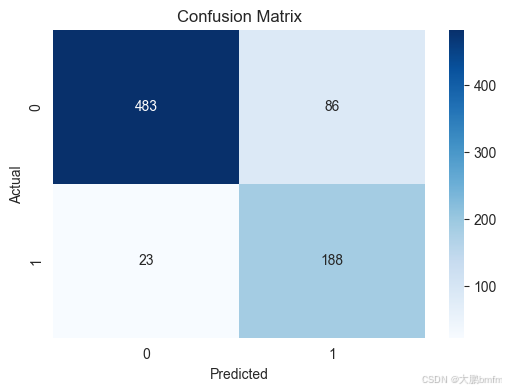
#  混淆矩阵可视化
plt.figure(figsize=(6, 4))
sns.heatmap(confusion_matrix(y_test, y_pred), annot=True, fmt='d', cmap='Blues')
plt.title("Confusion Matrix")
plt.xlabel("Predicted")
plt.ylabel("Actual")
plt.show()
重要性排序
In [67]:
importances = model_RF.feature_importances_
features = X.columns

# 将特征重要性和特征名称组合在一起,并按照重要性进行降序排序
feature_importance_data = sorted(zip(importances, features), reverse=True)
importances_sorted, features_sorted = zip(*feature_importance_data)

plt.figure(figsize=(12, 8))
# 绘制柱状图,按照降序排列的顺序绘制
sns.barplot(x=importances_sorted, y=features_sorted, palette='viridis')

# 计算重要性的均值
avg_importance = np.mean(importances_sorted)

# 添加红色竖立的虚线表示重要性均值
plt.axvline(x=avg_importance, color='r', linestyle='--', label=f'avg_importance={avg_importance:.2f}')

plt.title("Feature Importance")
plt.xlabel("Importance Score")
plt.ylabel("Features")
# 添加图例,设置图例位置等属性让其显示更合理
plt.legend(fontsize='medium')
plt.show()
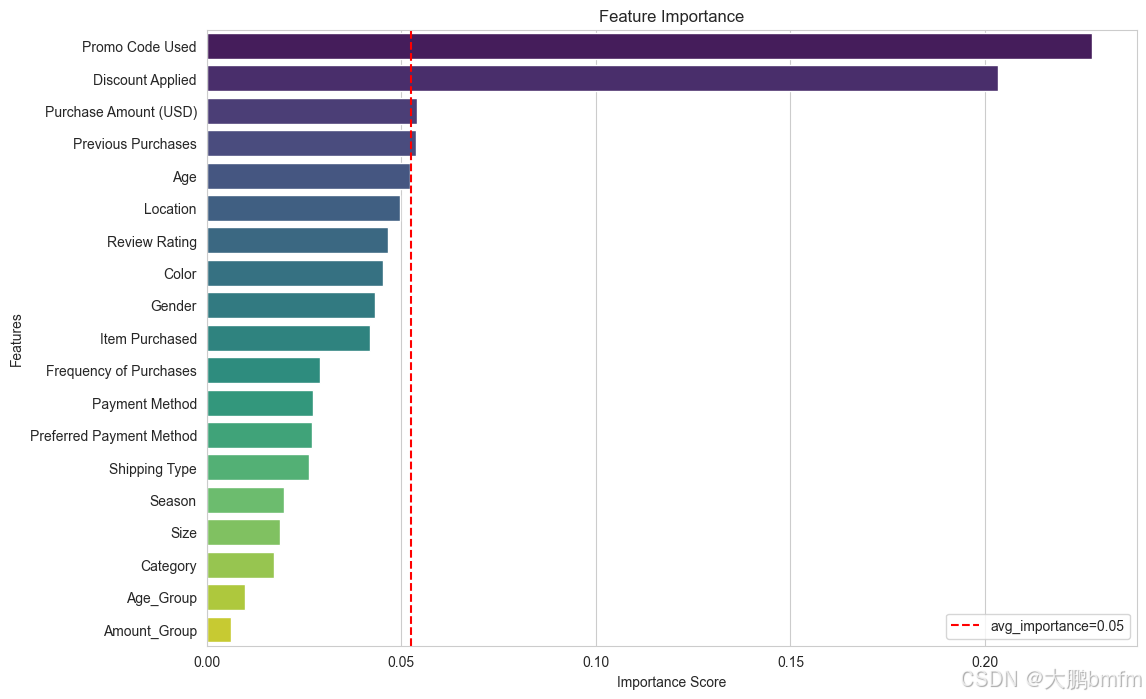
In [68]:
higher_than_avg_features = [(feature, importance) for importance, feature in zip(importances_sorted, features_sorted) if importance > avg_importance]
print("高于平均值的属性:")
for feature, importance in higher_than_avg_features:
    print(f"{feature}({importance:.3f})")
高于平均值的属性:
Promo Code Used(0.228)
Discount Applied(0.203)
Purchase Amount (USD)(0.054)
Previous Purchases(0.054)
神经网络
模型训练
In [69]:
from sklearn.neural_network import MLPClassifier
In [70]:
model_bp = MLPClassifier(hidden_layer_sizes=(5, 3))
model_bp.fit(X_train, y_train)

y_pred = model_bp.predict(X_test)
评估模型
In [71]:
print("Accuracy Score:", accuracy_score(y_test, y_pred))
print("\nClassification Report:\n", classification_report(y_test, y_pred))
Accuracy Score: 0.8525641025641025

Classification Report:
               precision    recall  f1-score   support

           0       0.97      0.83      0.89       569
           1       0.66      0.92      0.77       211

    accuracy                           0.85       780
   macro avg       0.81      0.87      0.83       780
weighted avg       0.88      0.85      0.86       780
In [72]:
#  混淆矩阵可视化
plt.figure(figsize=(6, 4))
sns.heatmap(confusion_matrix(y_test, y_pred), annot=True, fmt='d', cmap='Blues')
plt.title("Confusion Matrix")
plt.xlabel("Predicted")
plt.ylabel("Actual")
plt.show()
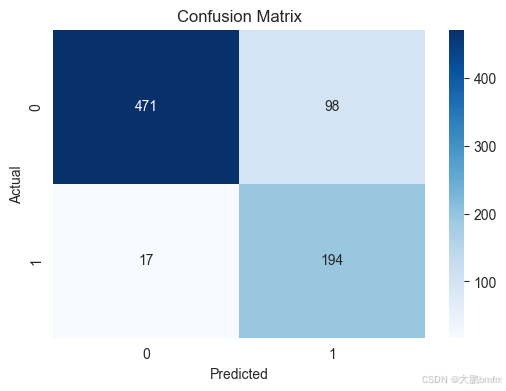
机器学习模型对比分析
具体分析:
- 在准确率方面:随机森林与神经网络模型的十分接近,准确率基本一致。
- 在类别 1 识别:首先,在召回率方面神经网络(95%)相比于随机森林的(89%)有优势。但是二者的准确率都较低,神经网络为66%,随机森林为69%。
- 在类别 0 识别:二者的精确率与找回率都较高。其中神经网络分别为(99%、82%),随机森林分别为(95%、85%),二者之间差距不明显。
总结对比可以得知,在准确率、类别0识别的差距都不明显的情况下,神经网络在类别1的识别效果更佳。
但是,神经网络在类别1的识别优势不是特别大,在考虑随机森林具有较强解释性(例如给出的重要性排序图)的情况下,这点优势可以忽略,所以综合对比分析可以得到,两个模型中,随机森林是更优的一个选择。
数据集获取请评论区留言

脑启社区是一个专注类脑智能领域的开发者社区。欢迎加入社区,共建类脑智能生态。社区为开发者提供了丰富的开源类脑工具软件、类脑算法模型及数据集、类脑知识库、类脑技术培训课程以及类脑应用案例等资源。
更多推荐

 31
31 0
0- 0


 已为社区贡献1条内容

所有评论(0)